VIPColor VP700 Replacement Ink Cartridges: Compatibility and Buying Guide
19th Oct 2026
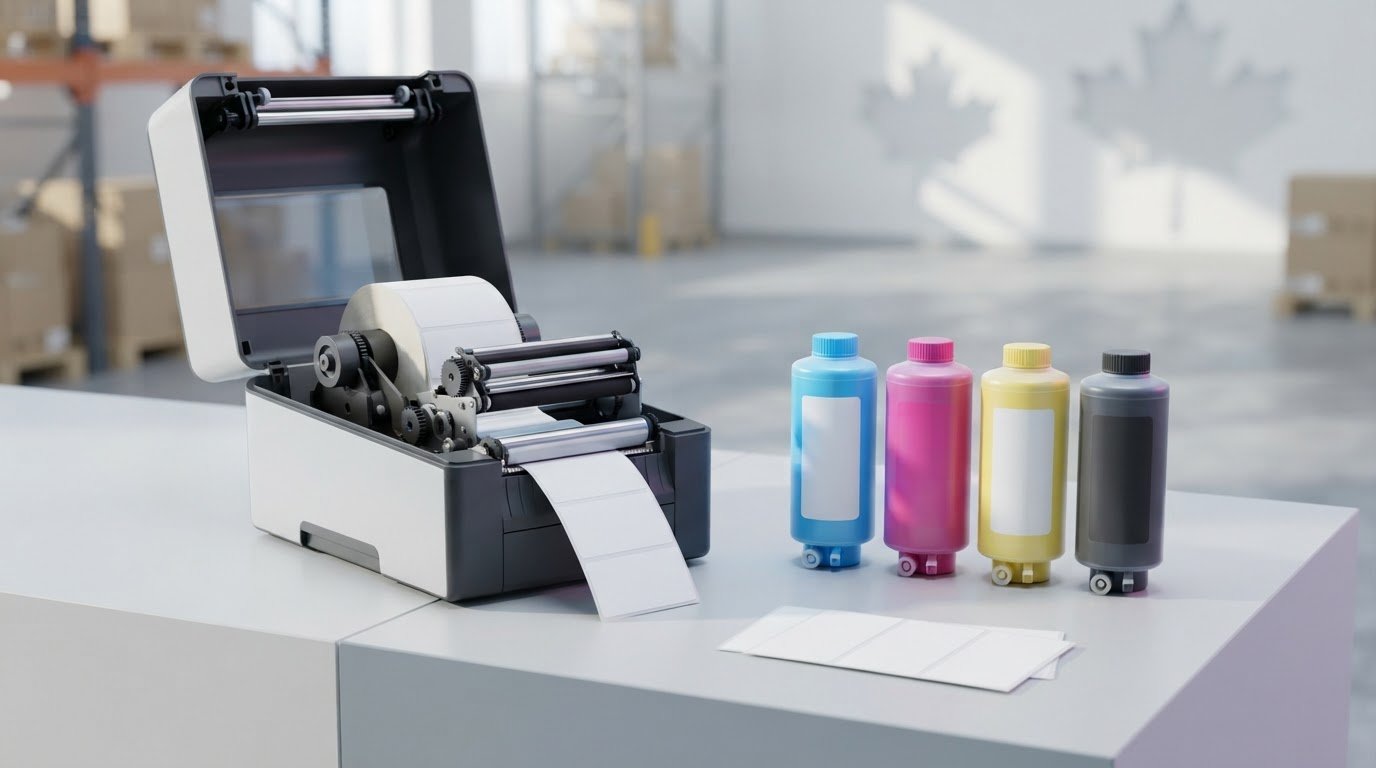
The quickest way to order the wrong ink is to shop by printer family instead of matching a cartridge to the exact model and ink type. For a VIPColor VP700, vipcolor vp700 replacement ink cartridges should be standard Memjet dye ink in 250 ml cartridges, not the water-enhanced dye ink used by other models.
Marketplace descriptions can blur the differences between printers that look similar. Before buying, check the cartridge capacity and ink formulation alongside the model name. This helps you distinguish VP700 cartridges from supplies intended for related VIPColor printers.
This guide explains how to identify the correct VP700 cartridges and why the VIPColor VP610 shares the same 250 ml standard Memjet dye ink. It also compares the VP700’s internal label unwinder with the VP610’s external unwinder, and explains why the VP550, VP660 and VP750 use a different ink family. These details help you match replacement ink to your printer and label application.
Key Takeaways
- Match vipcolor vp700 replacement ink cartridges by printer model, standard Memjet dye ink and 250 ml capacity.
- The VP610 shares the VP700’s standard ink and cartridge size, while its external unwinder is a key difference.
- The VP550, VP660 and VP750 use Memjet water-enhanced dye inks, a separate ink family.
- Treat cartridge page-yield figures as listing estimates, not guaranteed production outcomes.
- Follow the printer manufacturer’s instructions when replacing a cartridge, then inspect a test print.
Which replacement ink cartridges fit the VIPColor VP700?
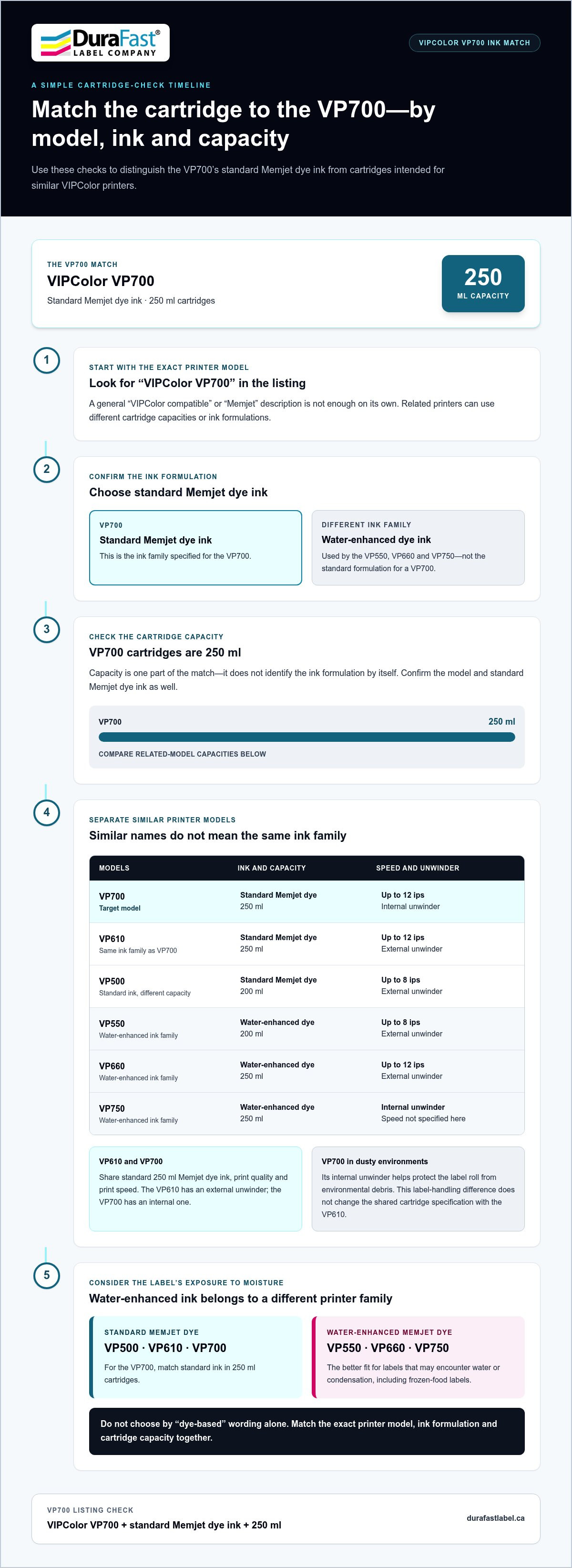
The VIPColor VP700 uses 250 ml cartridges filled with standard Memjet dye ink. When comparing listings, match the printer model, ink formulation and cartridge capacity. Those three details are the practical starting point for identifying vipcolor vp700 replacement ink cartridges. A listing that mentions only Memjet or VIPColor may not provide enough information to identify the right cartridge.
The VP700 cartridge match is VIPColor VP700, standard Memjet dye ink and 250 ml capacity. Check those specifications before weighing other listing claims. General information about Ink Cartridge Technology and Types explains how cartridges can vary, but compatibility depends on the printer’s stated requirements.
How to identify standard VP700 ink
Look for all three identifiers in the product description: VIPColor VP700, standard Memjet dye ink and 250 ml. Keep them together when comparing products. Capacity alone doesn’t identify the ink formulation, and a general reference to Memjet doesn’t confirm which printer model the cartridge is intended for.
Related VIPColor printers may use different cartridge capacities or ink families. The VP500, for example, uses standard Memjet dye ink in 200 ml cartridges. The VP550, VP660 and VP750 use Memjet water-enhanced dye inks, so their ink is not the standard formulation used in a VP700. Rely on explicit model and ink details rather than a broad claim such as “VIPColor compatible.”
Does the VP700 use the same cartridges as the VP610?
Yes. The VP610 and VP700 use the same 250 ml standard Memjet dye ink. They also share print quality and print speed, with the VP610 printing at up to 12 ips. A listing that names the VP610 may therefore apply to a VP700 if it clearly identifies the standard ink and matching capacity.
The models differ in label handling, not ink compatibility. The VP700 has an internal label unwinder, while the VP610 has an external unwinder. In dusty environments, the VP700’s internal unwinder helps protect the label roll from environmental debris. This feature doesn’t change the shared cartridge specification.
Separate the core compatibility details from additional listing claims. A yield estimate or firmware statement doesn’t replace the need to identify the model, ink formulation and capacity. Check those specifications first, then assess other claims separately.
Standard dye ink or water-enhanced ink: which VIPColor cartridge family is right?
Choose the ink family by printer model, not by a broad description such as “dye ink.” VIPColor’s VP500, VP610 and VP700 use standard Memjet dye ink. The VP550, VP660 and VP750 use Memjet water-enhanced dye inks, a different formulation for applications where labels may encounter moisture. These ink families aren’t interchangeable simply because the printers look similar.
Use this model comparison as a starting point:
- VP500: standard Memjet dye ink in 200 ml cartridges; prints at up to 8 ips.
- VP610 and VP700: standard Memjet dye ink in 250 ml cartridges. They share print speed and print quality.
- VP550: water-enhanced Memjet dye ink in 200 ml cartridges; prints at up to 8 ips.
- VP660 and VP750: water-enhanced Memjet dye ink in 250 ml cartridges. The VP660 prints at up to 12 ips.
Which models use standard Memjet dye ink?
The VP500, VP610 and VP700 use standard Memjet dye ink. Cartridge capacity differs within this group: the VP500 uses 200 ml cartridges, while the VP610 and VP700 use 250 ml cartridges. The VP610 and VP700 also share print speed and print quality. Identify the printer before using capacity alone to assess a listing.
When are water-enhanced dye inks the better fit?
If labels are expected to get wet or encounter condensation, such as frozen-food packaging, the water-enhanced ink family is the better fit. VIPColor uses this ink in the VP550, VP660 and VP750. Match replacement ink to one of those models rather than assuming water-enhanced dye ink is suitable for a VP700. The VP700 uses standard Memjet dye ink; similar model names or cartridge capacities don’t make the formulations interchangeable.
For more context on this printer family, the VIPColor VP550 business guide covers a model that uses water-enhanced dye ink. It can help clarify why the VP550 is not simply a VP500 with a different cartridge capacity. Consider the label’s likely exposure during use, then match the printer and ink family. Water-enhanced inks are intended for wet labels or labels exposed to water or condensation, while standard Memjet dye ink is the correct match for the VP700.
Don’t decide based only on a generic claim that an ink is “dye-based” or “water-resistant.” First establish whether the printer is a VP700 or one of the water-enhanced models, then compare the formulation and capacity specified for that model. This avoids choosing a cartridge family because one printer resembles another. For help finding VIPColor ink and label-printing supplies, contact DuraFast Label Company Canada.
How to assess VP700 replacement cartridge listings without relying on guesswork
A cartridge listing can sound suitable without clearly identifying the ink formulation or the printer it fits. Use the stated model, ink type and capacity as your evidence, then assess other claims separately. For the VP700, the compatibility details are standard Memjet dye ink and 250 ml cartridges. A broad “VIPColor compatible” label alone doesn’t establish that match.
What to verify on a cartridge listing
Before comparing price or advertised yield, scan the description for three specific details: the VP700 model, standard Memjet dye ink and 250 ml capacity. If one is missing, the listing hasn’t provided the full set of information needed to assess whether the cartridge matches the printer.
- Printer model: Look for an explicit reference to the VIPColor VP700, rather than a general mention of VIPColor printers.
- Ink formulation: Confirm that the description specifies standard Memjet dye ink, not water-enhanced dye ink.
- Capacity: Check that the cartridge is described as 250 ml.
Read the details together. A 250 ml capacity alone doesn’t identify the ink family, and a claim of Memjet compatibility doesn’t necessarily specify which VIPColor models the listing covers. The VP610 shares the VP700’s standard ink and cartridge capacity, but that doesn’t make every cartridge described for another VIPColor model a match. If a listing only says “compatible ink,” treat that as a broad description, not a complete compatibility specification.
Compatibility rule: The VP700 uses standard Memjet dye ink in 250 ml cartridges. Treat yield, firmware and performance statements as separate listing claims, not as substitutes for these specifications.
How to interpret yield, firmware and performance claims
An advertised page yield can help with rough planning, but it isn’t a guaranteed number of labels. Actual yield depends on what’s printed, including colour coverage, and on operating conditions. A detailed design may use ink differently from a simple one, so don’t assume a listing’s yield figure will match your production runs.
Firmware language also needs context. A marketplace listing might describe a cartridge as suited to a particular firmware version, but that wording alone doesn’t establish a universal requirement for every VP700. Don’t treat a seller’s statement as a printer-wide rule without reliable, model-specific support. Assess any such condition separately from the ink and capacity match.
Apply the same distinction to performance promises. Claims about output, longevity or savings may reflect a seller’s expectations or a particular test, not a result guaranteed for every label job. For a practical purchase decision, first establish that the product is identified for the VP700 and matches its standard Memjet dye ink and 250 ml capacity. Then assess any additional listing claims on their own merits.
How to prepare for a VIPColor VP700 ink cartridge replacement
A little preparation can make a cartridge change more orderly and help you spot output issues before returning to production. Confirm the printer model, have the matching ink ready, follow the manufacturer’s installation instructions, then inspect a test label. Use the printer’s documentation for the exact replacement steps rather than relying on general cartridge advice.
- Confirm the model. Check that the printer is a VIPColor VP700, then match the replacement to its standard Memjet dye ink and 250 ml capacity.
- Prepare the replacement. Have the correct cartridge ready before starting, and keep the work area organized so the installed and replacement cartridges aren’t confused.
- Follow the manufacturer’s instructions. Use the printer’s documented procedure for removing and installing the cartridge, including any prompts or setup steps it specifies.
- Inspect the result. Print a small test label and review the output before resuming regular label production.
Before removing the installed cartridge
Check the model name on the printer and compare it with the replacement description. Set the VP700-matched cartridge within reach, and keep the work area clear so you can complete the change without mixing it up with other supplies. Follow the manufacturer’s instructions for cartridge handling. Don’t improvise cleaning steps or storage conditions that aren’t in the printer documentation.
Where possible, plan the change around a convenient pause in production. This gives you time to follow the documented process and review the first print before starting another run. If you use inkjet label stock for regular jobs, a suitable piece of that stock can provide a practical surface for checking the result.
After installing the replacement
Follow any recognition or setup prompts shown by the printer, using its instructions rather than guessing what a message means. Then print a small test label. Check whether colours appear consistent and text or other printed details remain legible. This lets you notice an unexpected result before it affects a larger batch.
If the printer doesn’t recognize the cartridge or the test label looks unusual, pause production and consult the printer’s documented troubleshooting process. Avoid adding steps based on assumptions; the manual can guide you through the appropriate checks for that printer. Keeping a note of the cartridge change and what you observed can also make it easier to describe the situation if you need product guidance.
Keep the process simple: match the model, prepare the correct ink, follow the manufacturer’s procedure and inspect the output. For help with a VP700 ink replacement, contact DuraFast Label Company Canada about your cartridge needs.
Get help sourcing the right VIPColor VP700 replacement ink
For a VP700, the buying decision comes down to three details: the printer model, standard Memjet dye ink and 250 ml cartridge capacity. Keeping those specifications together makes it easier to distinguish the right replacement from listings that use broad compatibility language or describe a different VIPColor ink family.
The VP610 shares the VP700’s standard Memjet dye ink and 250 ml cartridge size, so a listing may identify both models. The VP700’s internal label unwinder is a printer feature, not a difference in ink compatibility. If you operate another model, use its full model name to guide the match rather than assuming that a similar printer uses the same formulation.
What information to have ready
A few details make a product question more specific. Note the model name shown on your printer and gather the cartridge listing details you’re comparing. Include the wording used for compatibility, ink type and capacity so you can compare the product with the printer’s requirements.
- Printer model: State whether the equipment is a VP700, VP610 or another VIPColor model.
- Ink description: Note whether the listing specifies standard Memjet dye ink or another formulation.
- Cartridge capacity: Record the stated capacity and compare it with the VP700’s 250 ml specification.
- Listing details: Share the product description or the particular compatibility wording that’s causing uncertainty.
These details keep the discussion focused on the model and ink match rather than less decisive claims such as advertised page yield. If a listing names several printer models, identify your exact machine and look for the ink formulation and capacity specified for it.
Connect with DuraFast Label Company Canada
Choosing vipcolor vp700 replacement ink cartridges doesn’t need to involve guesswork. DuraFast Label Company Canada sells VIPColor ink cartridges and label-printing supplies. When comparing products, share your printer model and the listing details so the key specifications are clear from the start.
Whether you’re planning a replacement or comparing product descriptions, a clear model-and-ink match is a practical step towards keeping label production organized. Contact DuraFast Label Company Canada about VP700 replacement ink.
Make your next ink replacement easier to plan
Once you’ve chosen the right vipcolor vp700 replacement ink cartridges, keep the product details with your printer records. Saving the listing or noting its identifying specifications gives your team a useful reference for the next replenishment, especially if you use more than one VIPColor model. A brief record of when a cartridge was changed can also help you plan future replacements around label runs instead of making a last-minute decision.
If a product description leaves you uncertain, include the printer model and listing details when requesting product guidance. This gives the discussion a clear starting point and keeps attention on the match your equipment needs. DuraFast Label Company Canada sells VIPColor ink cartridges and label-printing supplies.
Contact DuraFast Label Company Canada for help matching VP700 replacement ink and plan your next cartridge change with the correct specifications in hand.
Frequently Asked Questions
Can I use the same ink cartridges in a VIPColor VP610 and VP700?
Yes. The VP610 and VP700 use the same 250 ml standard Memjet dye ink and share print quality and print speed. The label unwinder helps distinguish the models: it’s internal on the VP700 and external on the VP610. If both printers are in your workspace, identify each model beside its ink supplies so staff can match the cartridge to the equipment before replacing it.
Are VIPColor VP700 replacement cartridges 250 ml?
Yes. The VP700 uses 250 ml cartridges with standard Memjet dye ink. The VP500 also uses standard dye ink, but its cartridges are 200 ml. The VP550, VP660 and VP750 use water-enhanced dye inks. If a listing groups several VIPColor models together, check the formulation and capacity for your specific model rather than relying on the product title alone.
Can I use VP550, VP660, or VP750 ink in a VP700?
No. The VP700 uses standard Memjet dye ink, while the VP550, VP660 and VP750 use water-enhanced dye inks. These are different ink families, so don’t choose a cartridge for the VP700 just because its listing mentions a related VIPColor printer. Water-enhanced ink is intended for wet labels or exposure to water or condensation, such as frozen-food labels. Match the cartridge to the model you operate.
What is the difference between VP700 and VP500 ink cartridges?
Both printers use standard Memjet dye ink, but their cartridge capacities differ: the VP500 uses 200 ml cartridges and the VP700 uses 250 ml cartridges. The VP500 prints at up to 8 ips, but print speed doesn’t determine cartridge compatibility. If you manage supplies for both models, identify their cartridge requirements clearly so the VP500’s smaller-capacity cartridge isn’t selected for the VP700.
How do I know whether a VP700 cartridge listing is compatible?
Look for an explicit VP700 match, standard Memjet dye ink and 250 ml capacity. Treat advertised page yield or firmware wording as a separate listing claim, not proof of compatibility. For example, “VIPColor compatible” without an ink type leaves an important detail unanswered. Compare the full description with the printer’s specifications before deciding whether it’s the right listing.
How should I replace a VIPColor VP700 ink cartridge?
Confirm the replacement matches the VP700, then follow the manufacturer’s instructions for removing and installing the cartridge. The printer’s documentation is the reference for the exact procedure and any recognition prompts, so avoid relying on steps written for a different printer. After installation, print a small test label and review it before resuming a larger run. If the result looks unusual, use the documented troubleshooting process.
Does the VP700 use standard or water-enhanced Memjet dye ink?
The VP700 uses standard Memjet dye ink. Water-enhanced dye ink is used by the VP550, VP660 and VP750, models intended for applications involving wet labels or condensation. For example, frozen-food labels may encounter condensation, making the ink family relevant when selecting a printer. Keep the printer model and intended label application in view when evaluating ink, and don’t assume the formulations are interchangeable.