Tabletop Label Slitter Rewinders for Packaging Lines
6th Nov 2026
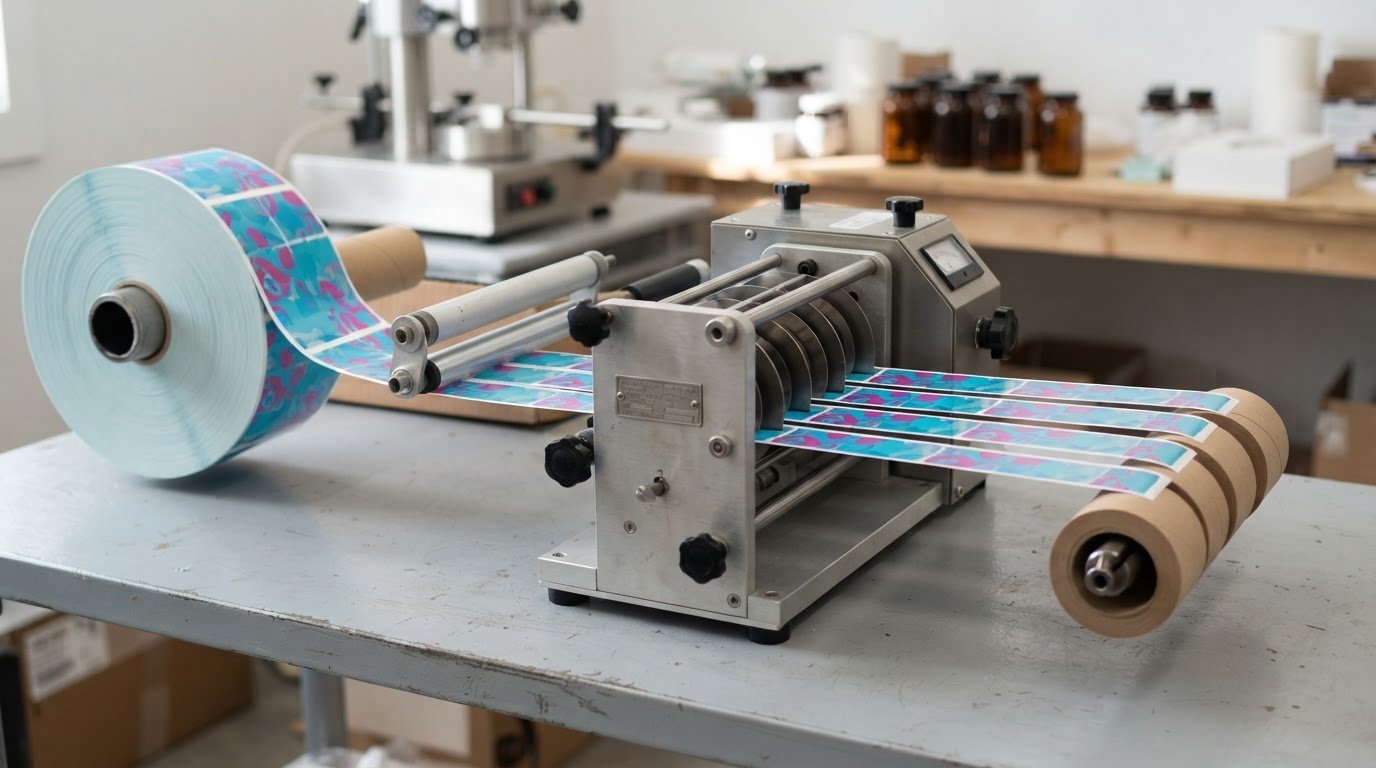
A tabletop label slitter and rewinder for packaging lines can work with several printer types, but the unit must suit the printer’s output and label roll. Most rewinders support thermal transfer, direct-thermal, inkjet and RFID-compatible label printers. A compatible rewinder can turn printed labels into clean, uniform rolls for the next step in production.
That flexibility makes rewinders useful across different packaging setups. They can work with desktop printers, print-and-apply systems, semi-automatic bottle labellers, and fully automated lines. Pharmaceutical applications may involve serialized barcodes, lot or batch identifiers, and unit-level tracking.
This guide explains how tabletop slitter rewinders work and which components and specifications affect fit, including tension control, speed, media width and core size. You’ll also learn how to assess applications across your workflow, from compact print operations to packaging lines, and decide whether a tabletop unit suits your printer and label requirements.
Key Takeaways
- Match the rewinder to your printer’s output and label stock to create neat rolls ready for the next packaging step.
- Compare tension control, speed, core size and media width to find a unit that fits your workflow.
- Choose a slitting method suited to the material and thickness, rather than treating every label stock the same.
- Consider how roll size and changeovers affect production flow, especially when jobs vary in format.
- Assess whether a tabletop setup fits your application, from compact print operations to labels used in packaging and tracking.
Why Use Automatic Roll Label Rewinder Machines?
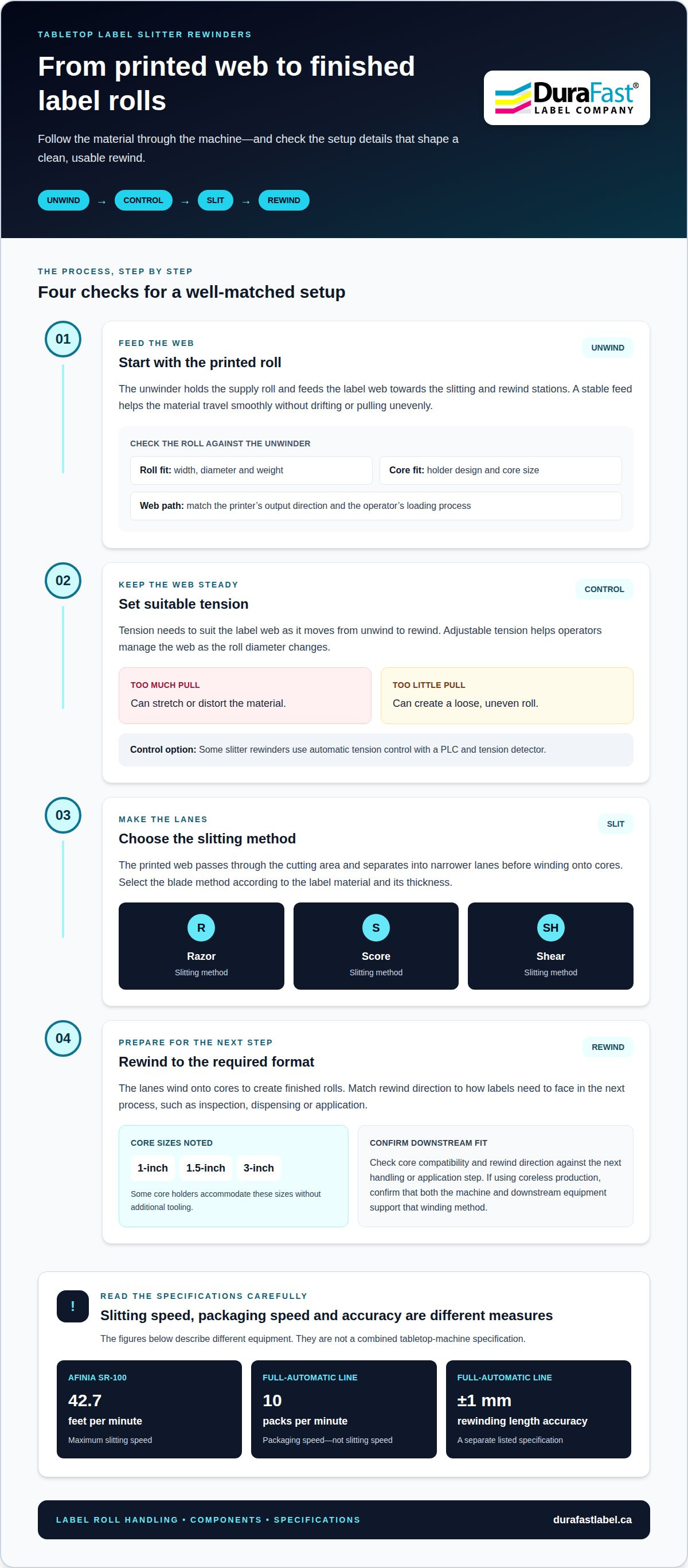
A tabletop Afinia SR-100 has a maximum slitting speed of 42.7 feet per minute. Separately, a full-automatic label slitter rewinder packaging line lists rewinding length accuracy of +/- 1 mm and packaging speed of 10 packs per minute.
Industry Applications and Production Volumes
Automatic rewinding prepares printed labels for the next production step. Pharmaceutical workflows may involve serialized barcodes, lot or batch identifiers, and unit-level tracking, while retail and logistics jobs often emphasize throughput. To choose a setup, consider your job mix, label format, required roll size, and how often production changes between jobs.
For smaller print operations, a tabletop unit can handle roll preparation without the footprint of a full packaging line. Higher-volume workflows may need the output pace and handling capacity of automatic equipment. A full-automatic line’s 10-pack-per-minute packaging speed describes packed output, not the rewinder’s slitting speed. Keep those measures distinct when estimating how equipment will fit into production.
Slitting Speed and Accuracy
Slitting speed describes how quickly a rewinder processes label material; packaging speed measures completed packs. The Afinia SR-100 reaches a maximum slitting speed of 42.7 feet per minute. The full-automatic packaging line lists rewinding length accuracy of +/- 1 mm. These figures apply to different equipment and shouldn’t be treated as a single tabletop-machine specification.
Compare the rated slitting speed with your printer’s output and the pace of the packaging task that follows. A faster rewinder will not improve throughput if the printer or packing process is the bottleneck. Consistent rewinding also matters: it helps produce rolls with the intended label length, while stable settings support repeatable runs.
Automatic roll production is useful when printed labels need to move from the printer to storage, inspection, or application. A rewinder gathers the web into a roll, making it easier to handle than loose material. If you switch jobs frequently, stored setup settings may help you repeat configurations and reduce changeover time. Match each setup to the label format and production requirements.
Coreless production is another consideration. A coreless roll is wound without a cardboard core, so the machine must support that winding method and the downstream equipment must accept the finished roll. Confirm that fit across the workflow before selecting this format. For specialized label jobs, formats such as inkjet card grading labels illustrate how applications can call for different roll-handling requirements.
Consider how larger rolls affect changeovers. They can reduce how often rolls need replacing, but require greater torque and weight capacity. Balance roll size and production pace with the next packaging step to decide whether tabletop or full-automatic equipment suits the job.
Unwind, tension control, and rewind components
A tabletop label slitter and rewinder feeds printed stock from an unwind roll, cuts it into narrower lanes, and winds the finished labels onto cores. Compare the blade type, tension control, core compatibility, rewind direction, and whether the unwinder suits your roll format.
Label Unwind and Roll Feeding
The unwinder holds the printed roll and feeds its label web towards the slitting and rewind stations. A stable feed helps the material travel smoothly without drifting or pulling unevenly. Check the roll’s width, diameter, weight, and core against the unwinder’s capacity and holder design. The feed path should also match the printer’s output direction and the operator’s loading process.
Core holders can accommodate 1-inch, 1.5-inch, and 3-inch cores without additional tooling. That range can simplify setup when jobs use different roll formats. Confirm that the printed roll sits securely and feeds without skew, since alignment at the unwind stage affects the lanes formed downstream.
Unwinder Configuration and Turret Components
The unwinder configuration determines where the supply roll sits and how the web enters the machine. A tabletop unit may use a compact external unwinder, while a printer with an internal unwinder feeds stock from inside its enclosure. Choose an arrangement that suits the available space, provides access for roll changes, and positions the printer and slitter effectively.
Turret rewinders and unwinders use rotating positions to manage rolls during production. This makes roll changes part of the machine’s operating sequence, rather than using the same handling arrangement as a single-position setup. Compare how the turret handles the roll and web path, particularly if production involves repeated changes or multiple finished rolls.
Tension Control and Rewind Direction
Tension must stay suitable as the label web travels from unwind to rewind. Too much pull can stretch or distort the material; too little can create a loose, uneven roll. Slitter rewinders may use automatic tension control with a PLC and tension detector. Adjustable tension helps operators manage the web as roll diameter changes.
Rewind direction determines how labels face when the roll is removed. Match it to the next process, such as inspection, dispensing, or application. Compare rewinder speed with printer output, or consider variable speed for more precise control. This helps prevent one machine from pulling ahead of the other.
Slitting and Rewinding Operation
During operation, the printed web unwinds, passes through the cutting area, and separates into narrower lanes before winding onto cores. The machine may use razor, score, or shear slitting, selected according to the material and its thickness. Blade choice affects whether the machine suits your stock and finished label widths.
Before a run, operators set the web path, blade positions, tension, core holders, and rewind direction. They then check that each lane tracks cleanly and winds evenly. For assistance matching components to a printer and workflow, discuss your label rewinding requirements.
Machine specifications and operating ranges
Check the machine’s dimensions, media limits, slitting range, and inspection requirements against your workspace and label jobs. Its specifications should match both the printer output and the finished roll requirements.
In Canada, match the machine’s electrical rating to the installation and applicable provincial or territorial requirements. Before purchasing, compare warranty coverage, service arrangements, and the scope of technical support. Workplace procedures should cover moving rolls, blade access, and safe adjustments.
To set up the machine, load the supply roll, route the web, position the blades, fit the rewind core, and set tension and speed. During operation, monitor web tracking and roll formation. Maintain the machine according to its operating instructions, and inspect the blades and feed components before use.
Slitter rewinders pose cutting and pinch-point risks around blades, rollers, and moving rolls. Keep hands clear during operation, use guards as designed, and stop the machine before adjusting it or clearing a jam.
Media width, roll size, and slitting range
Specifications vary by machine, so use the model’s operating limits rather than assuming all tabletop units share a range. The Afinia SR-100 supports media widths up to 8.66 inches (220 mm), works with rolls up to 9.84 inches in diameter, and can slit labels as narrow as 0.86 inches (21.9 mm). It includes four slitting blades and requires a 3-inch (76.2 mm) cardboard core.
Compare those limits with the printed roll and the widths needed after slitting. The full-automatic packaging line in the available specifications lists a 76 mm unwinder core diameter and a 30 mm minimum slitter width. These figures describe that packaging line, not the SR-100.
Footprint and operating conditions
Allow for the machine, roll loading, and operator access when planning a tabletop station. The Afinia SR-100 measures 16.73 × 28.34 × 14.56 inches and weighs 55 lbs (25 kg). Its maximum slitting speed is 42.7 feet per minute, which helps establish a reference for matching the rewinder to printer output.
Compare rated speed with the full workflow, including pauses for roll changes and inspection. A video or vision inspection system can help operators examine labels during production, while a clear view of the web makes tracking problems easier to spot.
Inspection, maintenance, and support
Inspection can identify defects before a finished roll reaches application. Include print quality, cut edges, lane alignment, and winding consistency in production checks. Video and vision systems can support closer operator review, but machine settings and inspection criteria must still suit each label job.
When planning service, clarify how technical support handles setup questions, operating issues, and replacement parts, and review the warranty terms. Keep operating instructions accessible, record settings for repeat jobs, and include blade condition and web-path cleanliness in routine maintenance.
Slitter rewinder manufacturers for packaging and label converting
Tabletop slitters suit compact converting tasks; industrial machines suit broader production-line integration. Choose by matching the material, finished format, output pace, and next packaging step.
Machine Selection for Packaging Lines
Start with the material and the required finished roll or sheet format. A manufacturer’s range may include specialty models for narrowing printed rolls, as well as systems for roll-to-roll, roll-to-stack, or roll-to-sheet conversion. Each format affects how labels leave the machine and enter packaging. Match the slitting method to the material and its thickness.
Razor, score, and shear slitting suit different material types and thicknesses. Identify the method that fits your stock and finished widths, then consider how the rewinder will connect with the printer and packaging equipment. A tabletop unit may suit a print shop preparing compact label rolls, while a converting line may need more integrated handling.
Label Converting and Finishing Lines
Converting may involve slitting printed stock into narrower rolls and preparing them for later use. Roll-to-stack and roll-to-sheet workflows produce different formats, so the finishing equipment must match the required output. Manufacturers may offer configurations with inline winding, refined drives and motors, or differential winding for slit ribbons.
For example, a ribbon job split into several narrow lanes may benefit from differential winding. A roll-to-sheet job instead needs an output arrangement that handles cut sheets. Compare the entire process, from incoming printed web to finished format, rather than choosing a slitter based on blade type alone. Ergonomics and safety features also affect how operators load, adjust, and remove rolls.
Tabletop and Industrial Slitter Comparison
A tabletop slitter rewinder offers a compact option for small businesses, craft producers, and print shops. It can suit operations that need to finish printed rolls without building a larger converting line. Industrial slitters are designed for broader production processes, where material handling and downstream equipment shape the machine choice.
Compare the tasks each setup must perform. A compact print shop may need to narrow and rewind rolls for a limited range of jobs. A packaging or converting line may require inline winding, ribbon separation, or roll-to-sheet handling. Consider available space, material range, finished formats, and operator workflow before choosing a machine class.
Drive and motor design, winding methods, ergonomics, and safety features all influence how a machine fits its production role. Inline winding, for example, can connect slitting with roll handling, while differential winding handles multiple slit ribbons. Choose a configuration based on the actual converting sequence, not a general preference for tabletop or industrial equipment.
Use a practical selection sequence: define the stock and thickness, identify the finished format, choose a compatible slitting method, then map the output to the next packaging step. This gives manufacturers a clear basis for matching a machine to a converting line or compact finishing station.
Tabletop label rewinder applications
A tabletop rewinder suits applications that need finished label rolls near the printer without requiring a large converting line. A tabletop label slitter and rewinder for packaging lines can prepare printed labels for storage, dispensing, or application. Its usefulness depends on the next task and the label format that task requires.
The Afinia SR-100 is designed for small-label jobs such as lip balm, health and beauty products, and vape labels. For a lip balm run, an operator can prepare printed labels as rolls for the packaging stage. Health and beauty jobs may involve different label formats, so the rewinder’s slitting setup and finished roll need to suit the printed stock.
A tabletop label slitter and rewinder for packaging lines can also fit workflows involving desktop printers, print-and-apply systems, semi-automatic bottle labellers, and fully automated lines. Each connection has its own handoff: a print-and-apply system needs a roll suited to its unwind path, while a desktop printer may be used for short, varied runs.
For serialized barcodes, lot or batch identifiers, and unit-level tracking, consider how labels will be used after rewinding. A roll prepared for bottle labelling has different handling needs from one prepared for bench application. Define the handoff before choosing a winding format so the finished roll suits the next operation.
Material matters as well. The Afinia SR-100 is compatible with paper, polyester, polypropylene, and vinyl label stocks. For example, a producer using vinyl should consider whether the slitting setup and finished roll suit the specific label job. A tabletop setup can be practical when it supports the workflow’s production pace and changeover pattern; a broader automated line may fit better when rewinding is one part of continuous packaging.
To discuss a label rewinding workflow, contact the team about your application.
Label application machines operate within a narrow tolerance window for web and winding tension throughout the roll, so consistent winding is important for reliable handoffs.
DuraFast Label Company Canada: Label Rewinders and Finishers
DuraFast Label Company Canada offers Label Rewinders and Finishers for workflows that need printed rolls prepared for handling or application. The right fit depends on your printer, label stock, roll dimensions, core size, and next packaging step. Sharing those details helps narrow the options to equipment suited to your workflow.
If you’re selecting a complete setup, DuraFast also offers VIPColor Label Printers, Afinia Label Printers, and Dymo LabelWriter label printers. These options serve different printing needs, while a rewinder or finisher supports roll handling after printing. Contact DuraFast Label Company Canada to discuss your printer and label rewinding requirements.
Plan the next step for your label workflow
Define how printed rolls should move through packaging, from printer output to application. A tabletop label slitter and rewinder for packaging lines should fit that sequence rather than create an extra handling step. Consider the printer, label material, finished roll format, and equipment that will receive each roll.
DuraFast Label Company Canada offers VIPColor, Afinia, and Primera Label Printers, alongside Label Rewinders and Finishers. If you’re building or adjusting a setup, these products can help frame equipment choices around your workflow. The next step is to discuss the labels you produce and how you need them prepared.
Contact DuraFast Label Company Canada to talk through your label printing and rewinding needs. A clear workflow gives you a practical starting point for choosing equipment with confidence.
Frequently Asked Questions
Can rewinders work with any label printer?
Not necessarily. A rewinder must match the printer’s output speed, label path, roll dimensions, and winding direction. Rewinders can support thermal-transfer, direct-thermal, inkjet, and RFID-compatible printers, but these categories do not guarantee compatibility with every model. For example, a printer that presents labels in a particular orientation needs a matching rewind direction. Compare the printer’s output roll with the rewinder’s operating limits.
What is the benefit of a tabletop rewinder?
A tabletop rewinder provides roll finishing beside a printer without using floor space for a larger converting machine. At a shared workstation handling short, varied jobs, it keeps printing and roll preparation together, making batches easier to stage for later use. It may be less suitable for workflows requiring continuous, high-volume conversion or tightly integrated automated packing.
What label materials, widths, roll diameters, and core sizes can tabletop slitters handle?
Capacity depends on the model. The Afinia SR-100 handles paper, polyester, polypropylene, and vinyl. Its media width is up to 8.66 inches (220 mm), its maximum roll diameter is 9.84 inches, and it requires a 3-inch (76.2 mm) cardboard core. It can slit labels as narrow as 0.86 inches (21.9 mm). Treat these as SR-100 specifications, not universal tabletop limits.
How can a tabletop slitter rewinder integrate with a packaging line or label printer?
Integration means transferring printed stock from the printer into a finished roll that suits the next operator or machine. Match the feed and rewind direction, core, label width, and operating speed. A print-and-apply system needs rolls oriented for its unwind path, while bench application may favour convenient roll handling. A short test run can reveal tracking or handoff issues before production begins.