Seiko SLP850 Replaces SLP650: Key Features and Benefits
17th Aug 2026
What if your labelling system could eliminate waste and increase output speed simultaneously? If you've managed a busy production line or retail centre, you know that operational downtime from slow printing is a silent profit killer. You've likely relied on the SLP600 series for its reliability, but older serial-only systems often struggle with modern connectivity requirements. The Seiko SLP850 Replaces SLP650 Printer as the new standard, offering a sophisticated solution for Canadian businesses looking to modernize their workflows. It's a strategic upgrade designed to handle everything from standard shipping labels to the new Health Canada front-of-package nutrition symbols with ease.
We understand that switching hardware can feel like a logistical hurdle, but this transition is remarkably seamless. In this article, you'll discover how the SLP850 improves upon its predecessor with faster speeds of up to 4.72 ips and innovative linerless label support. We'll clarify how your existing SLP600 series labels remain compatible and help you identify whether the USB, Serial, or Bluetooth model is the better choice for your specific environment. By the end of this guide, you'll see how this high-performance printer maximizes your resources while ensuring your labelling process is both durable and fiscally responsible.
Key Takeaways
- The Seiko SLP850 Replaces SLP650 Printer as the flagship 2-inch thermal solution, offering a modernized architecture and a more compact footprint for your workspace.
- Experience a significant boost in productivity with print speeds reaching up to 4.7 ips, ensuring your labelling operations keep pace with high-demand environments.
- Future-proof your hardware with versatile connectivity options, including USB-C, Bluetooth, and Serial interfaces that support Windows, macOS, and mobile operating systems.
- Reduce backing paper waste and lower your environmental impact by utilizing new linerless label technology without losing compatibility with existing SLP600 series labels.
- Identify the ideal model for your specific centre by comparing the specialized secondary interfaces designed for different industrial and retail workflows.
The Evolution of Smart Labelling: Transitioning from the SLP650 to the SLP850
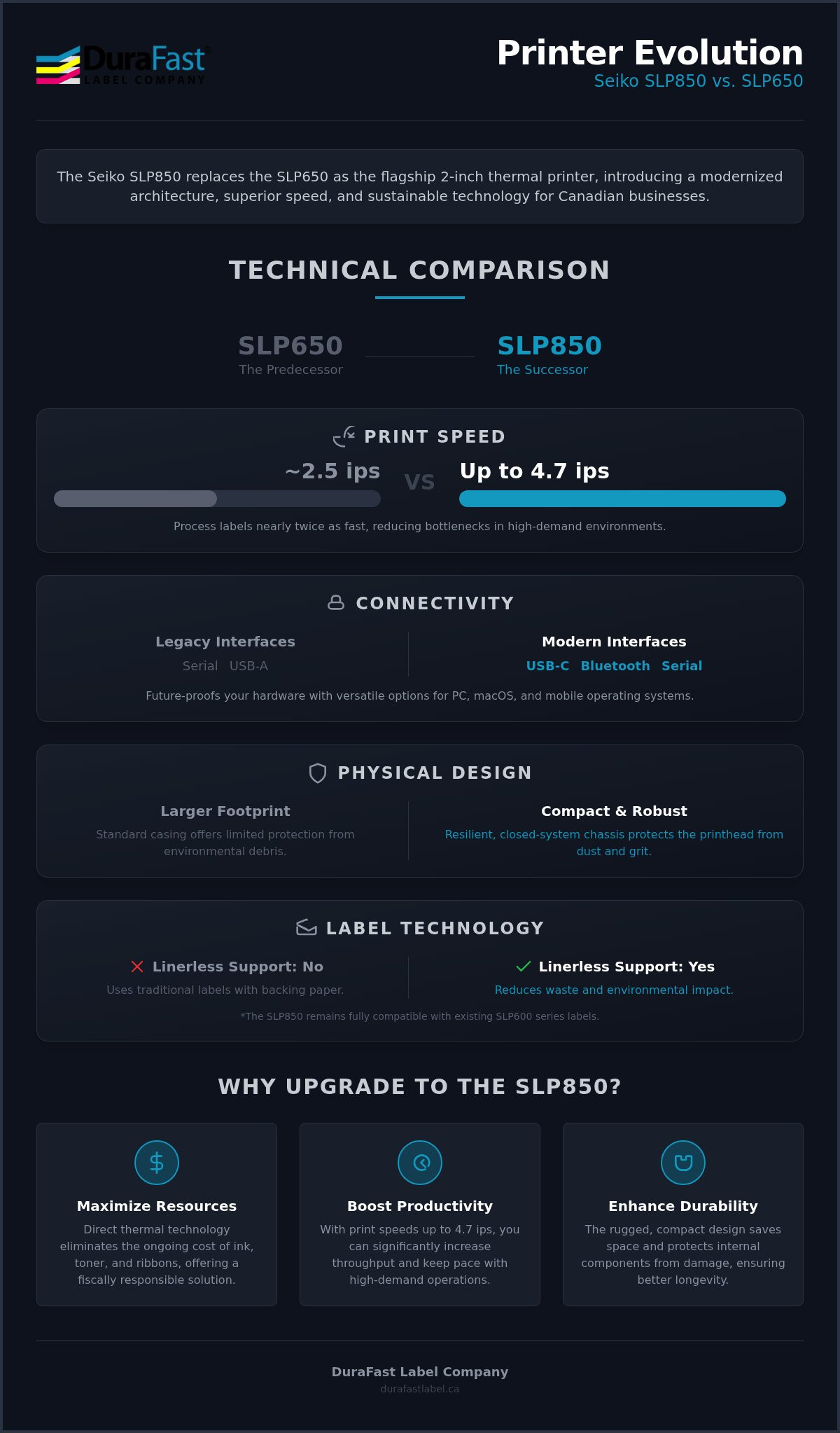
The Seiko SLP850 officially replaces the SLP650 as the flagship 2-inch thermal printer. While the SLP650 served as a reliable industry standard for years, the shift in hardware requirements and sustainability goals necessitated a complete redesign. The main difference between these models lies in the modernized architecture and footprint; however, it maintains the 300 DPI high-resolution output that established its predecessor's reputation. This continuity ensures that your barcodes and text remain crisp and professional, even as you upgrade to more capable hardware. For those managing busy distribution hubs, the fact that the Seiko SLP850 Replaces SLP650 Printer models means you gain access to a strategic upgrade designed for operational seamlessness.
Why Seiko Retired the SLP650 Series
Technological standards evolved faster than the SLP650's original design could accommodate. One primary driver was the need for modernized connectivity, specifically USB-C, to match current PC and mobile hardware used across Canadian businesses. Additionally, there is an increasing demand for sustainable, linerless labelling solutions in logistics. The SLP850 addresses this by supporting media that eliminates backing paper waste. Seiko also recognized the need for a more robust design capable of resisting environmental debris in dusty warehouses or busy retail environments. By integrating direct thermal printing technology into a more resilient chassis, the new series offers better longevity for high-volume users. This move toward a closed-system design helps prevent dust and grit from interfering with the printhead, which is a common cause of premature failure in older models.
First Look: The SLP850 Compact Design
As the Seiko SLP850 Replaces SLP650 Printer, it realizes a smaller desktop footprint by significantly reducing both height and depth. When you compare dimensions, it's clear that this printer was designed to maximize space in cramped shipping centres. This lower profile has a tangible impact on workstation ergonomics and visibility, allowing operators to keep their workspace organized without a bulky unit obstructing their line of sight. Beyond aesthetics, the printer features improved internal mechanisms to reduce jams and maintenance requirements. If your workflow involves constant label output, these mechanical refinements prevent the frustration of frequent downtime. For businesses currently using legacy equipment, switching to the new model allows you to reclaim valuable desk space while gaining access to faster processing. You can find the right supplies for your new setup by browsing Seiko SLP850 labels, ensuring your transition is as smooth as possible.
Technical Comparison: How the SLP850 Outperforms Its Predecessor
The Seiko SLP850 Replaces SLP650 Printer as a high-performance successor designed for demanding Canadian operations. While both units utilize direct thermal labels, the SLP850 introduces hardware refinements that directly address the pain points of legacy systems. You no longer have to worry about the cost and complexity of ink, toner, or ribbons. This direct thermal approach ensures fiscal responsibility while maintaining a clean, efficient workspace. One of the most critical improvements is the enhanced casing. In industrial settings where environmental debris is common, this protective shell shields the sensitive internal components, preventing the printhead damage that often plagued older models. The main difference in daily operation is the increased reliability provided by this ruggedized chassis.
Speed and Efficiency Metrics
Can your current printer keep up with peak shipping hours? The SLP850 reaches a maximum print speed of up to 4.7 ips (120mm/s). This is a significant leap forward from the SLP650, allowing you to process labels nearly twice as fast during high-volume tasks. Faster throughput does more than just save time; it actively reduces bottlenecks in time-sensitive shipping environments. The SLP850 is also engineered for a more consistent duty cycle. It handles the rigours of daily use with greater resilience, ensuring that your production line stays moving without the frequent pauses for cooling or adjustments often required by legacy hardware. This makes the SLP850 a better choice for high-traffic centres.
Print Quality and Precision
Consistency is vital when your business relies on scannable barcodes. Both models offer a 300 DPI resolution, which is the benchmark for producing crisp, high-contrast graphics and small text. This level of precision is necessary for maintaining compliance with global barcode standards, ensuring your packages are accepted by major carriers and retailers without issue. The high-quality thermal printhead in the SLP850 is specifically calibrated for precision. To ensure your hardware continues to perform at this level, it's helpful to follow a Thermal Printheads Maintenance Guide to extend the life of your investment. Regular cleaning prevents debris buildup, which is essential for maintaining the high-contrast output required for modern scanners.
If you need help determining if your current label stock is optimized for these higher speeds, speak with one of our technical advisors today. We can help you verify compatibility and ensure your transition to the new hardware is seamless.
Connectivity Options: USB-C, Bluetooth, and the Serial Upgrade Path
Modernizing connectivity is a cornerstone of why the Seiko SLP850 Replaces SLP650 Printer. While the older series relied on aging standards that often required specialized adapters for newer computers, the SLP850 introduces USB-C as the baseline for modern PC and Mac integration. This shift ensures that your hardware is ready for the next generation of computing devices. The only difference between the standard and specialized models in this lineup is the secondary interface provided on the back of the unit. By standardizing the core hardware, Seiko allows you to choose a configuration that fits your specific infrastructure while maintaining consistent print performance across your entire centre.
Choosing the Right Interface for Your Business
Selecting the correct model depends entirely on your existing setup and future goals. For most standard desktop workstations, the USB model is the most efficient choice, providing plug-and-play simplicity for office and retail environments. It's built to handle high-volume tasks without the complexity of additional networking configurations.
However, many industrial operations still rely on established serial loops for their data communication. If you are specifically tasked with replacing legacy Seiko SLP650SE printers, the Serial model preserves that essential connectivity. This allows for a drop-in replacement that won't disrupt your established workflows or require a complete overhaul of your system architecture.
For businesses moving toward a more agile, mobile-first approach, the Bluetooth model is the better choice. This configuration is ideal for mobile warehouse applications where labels need to be printed directly from tablets or handheld scanners. By eliminating the physical tether to a PC, your team can organize labelling tasks exactly where the work happens, significantly reducing the time spent walking back and forth to a central station.
Software and Mobile Integration
Hardware is only half of the equation; the software ecosystem is where the SLP850 truly excels. The new Smart Label Editor software offers a streamlined interface that simplifies label design for both Windows and macOS users. If you work in a multi-platform environment, you will appreciate the consistent experience across different operating systems. For those using the Bluetooth-enabled models, the ability to print from mobile apps on iOS and Android devices changes the way you manage inventory. You can design and print labels on the go, ensuring that your marking and distribution processes remain fluid and responsive to real-time needs. This integrated approach ensures that your transition to the SLP850 is a significant upgrade to your overall labelling intelligence.
Linerless Innovation and Label Compatibility for Canadian Operations
As the Seiko SLP850 Replaces SLP650 Printer, it brings a significant shift in media versatility. It is the first printer in its class to support linerless technology. Traditional labels generate a massive amount of non-recyclable backing paper waste. By eliminating this liner, you reduce your environmental footprint while simultaneously lowering operational costs. This innovation allows you to print labels of any length from a single roll, which is a major advantage for businesses with diverse inventory needs. You no longer need to keep multiple sizes of die-cut labels in stock for different tasks. It's a smarter way to manage your consumables without sacrificing the quality of your output.
The Benefits of Linerless Labelling
Why should your business switch to linerless? One primary benefit is increased roll capacity. Since there is no bulky backing paper, you get more usable material on every roll. This translates to fewer changeovers and less downtime for your staff during peak hours. In busy Canadian warehouses, discarded backing paper is often a slip hazard. Removing the liner entirely makes for a safer, cleaner workspace. Additionally, custom length printing provides unmatched flexibility. You can organize your inventory with labels that are exactly as long as the data requires. This prevents the waste of unused white space on pre-sized labels, which is particularly useful for meeting Canadian labelling standards where the amount of required text can vary between different product batches.
Backwards Compatibility and Consumables
Transitioning to new hardware shouldn't mean wasting your current supplies. Good news for existing users: the SLP850 is fully compatible with Seiko SLP600 series labels and legacy SLP650 stock. This allows you to use up your existing inventory before moving to newer media. When you are ready to restock, you can explore the full range of SLP850 labels designed specifically for the new unit's higher speeds. This backwards compatibility ensures that your transition is fiscally responsible and avoids the logistical headache of sudden media obsolescence. However, you must consider your specific environment. If your labels will be introduced to water or condensation for frozen foods, choosing the correct adhesive is vital. For more details on choosing the right printer for these specific conditions, consult our Direct Thermal Label Comparison.
If you are unsure which roll configuration is best for your current setup, contact our labelling experts for a personalized recommendation based on your specific operational needs.
Prescriptive Guidance: Is the Seiko SLP850 the Right Choice for Your Workflow?
How do you determine if it's time to retire your legacy hardware? The Seiko SLP850 Replaces SLP650 Printer as a strategic necessity rather than just an optional hardware update. For businesses looking to future-proof their operations, the transition to USB-C ensures long-term compatibility with the latest generation of computing devices. It's an ideal choice for facilities prone to environmental debris. The enclosed, compact design protects sensitive internal mechanisms from the dust and grit frequently found in Canadian industrial centres. This printer serves as a curative solution for teams struggling with the logistical hurdles of traditional label liners, offering a path toward a more efficient and fiscally responsible labelling process.
When to Upgrade Your Current SLP650
Identifying the right moment for an upgrade often comes down to recognizing operational bottlenecks. If your current order fulfillment speed is lagging behind your demand, the SLP850 provides the throughput necessary to keep your production moving. You should also consider an upgrade if your workflow requires printing from mobile devices via Bluetooth. This functionality is absent in the older series and is essential for agile warehouse management. Sustainability goals also play a major role in this decision. If your organization is committed to reducing non-recyclable backing paper waste, moving to linerless media is the logical conclusion for any Canadian business currently maintaining SLP650 fleets.
Implementation and Next Steps
Transitioning to a new system requires a methodical approach to ensure no disruption to your daily marking and distribution tasks. Your first step should be validating your current connectivity requirements. While USB-C is the new standard, you must decide if your specific infrastructure still requires a Serial port or if the Bluetooth model is a better choice for your mobile team. Consulting with the experts at DuraFast Label can help you navigate this transition, ensuring you select the correct hardware configuration and compatible SLP850 labels for your environment. For a broader perspective on how these units compare to other options in the market, you can refer to our Comprehensive Guide to Thermal Label Printers. Taking control of your production process now will ensure your labelling operations remain seamless and reliable for years to come.
Modernize Your Canadian Labelling Operations Today
The transition to a more efficient and sustainable workflow is now accessible. Since the Seiko SLP850 Replaces SLP650 Printer, businesses across Canada can finally resolve the challenges of operational downtime and excessive liner waste. You gain a significant performance boost with speeds up to 4.7 ips and the flexibility of USB-C, Serial, or Bluetooth connectivity. This upgrade isn't just about new hardware; it's about reclaiming your workspace and ensuring your labelling process remains fiscally responsible and environmentally conscious.
DuraFast Label is your Authorized Canadian Seiko Reseller, providing expert technical support for fleet upgrades and a full stock of compatible SLP850 labels. We're here to ensure your transition is seamless and your production remains uninterrupted. If you're ready to take control of your marking and distribution processes with industrial-grade reliability, our team is prepared to guide you through the selection of the ideal configuration for your specific centre.
Browse the Seiko SLP850 Series at DuraFast Label Canada and start optimizing your production today.
Frequently Asked Questions
Is the Seiko SLP850 the direct replacement for the SLP 650?
Yes, the SLP850 is the official and direct successor to the discontinued SLP650 series. While it retains the industry-standard 300 DPI resolution, it introduces a completely modernized architecture and a more compact chassis. This ensures that the Seiko SLP850 Replaces SLP650 Printer effectively by offering better performance while fitting into tight workstations. It's designed to provide the hardware longevity required for modern industrial and retail environments across the country.
Will my existing Seiko SLP650 labels work in the new SLP850 printer?
You can continue using your existing SLP600 series media without any issues. The SLP850 is fully backwards compatible with legacy SLP650 labels, meaning you don't have to discard your current inventory when upgrading. This makes the transition fiscally responsible for Canadian businesses. Once you've exhausted your current stock, you can move to the newer linerless options or continue with traditional die-cut rolls based on your specific operational requirements.
Does the Seiko SLP850 support Bluetooth connectivity?
Bluetooth connectivity is available on specialized models within the series. If your team requires mobile printing from iOS or Android devices, the SLP850-BK0C11-03 model is the correct choice. This version includes both USB and Bluetooth interfaces, allowing for a more agile warehouse setup. It eliminates the need for a physical tether to a workstation, enabling your staff to design and print labels directly from handheld tablets or scanners on the go.
What are the main differences between the SLP850 and the SLP650?
The main difference between the two units is the significant boost in print speed and connectivity. The SLP850 reaches up to 4.7 ips, providing a major performance increase over the legacy series. Additionally, the new model features a smaller physical footprint and replaces older ports with modern USB-C. The Seiko SLP850 Replaces SLP650 Printer as a more versatile tool by including support for linerless labels and optional Bluetooth or Serial secondary interfaces.
Can the Seiko SLP850 print linerless labels?
The SLP850 is the first printer in its class to offer native support for linerless labels. This technology allows you to print custom-length labels from a single roll without any backing paper waste. It's a curative solution for businesses looking to reduce their environmental impact and eliminate the slip hazards associated with discarded liners. By using linerless rolls, you also benefit from increased roll capacity, meaning fewer changeovers during busy production shifts.
Is the Seiko SLP850 compatible with Windows and Mac?
This printer is fully compatible with Windows and macOS through the Smart Label Creator software. Additionally, the Bluetooth-enabled models support mobile operating systems like iOS and Android via the SII Layout Editor. This cross-platform compatibility ensures that your labelling process remains consistent regardless of your hardware environment. Whether you're working from a desktop workstation or a mobile tablet, the software provides a streamlined experience for designing and printing professional, high-contrast barcodes.
Does the Seiko SLP850 require ink or toner?
The SLP850 uses direct thermal technology, so it doesn't require any ink, toner, or ribbons. The printhead applies heat directly to chemically treated paper to create the image. This approach maximizes your resources by eliminating the cost and maintenance associated with traditional printing consumables. It's a highly efficient choice for high-volume labelling tasks where fiscal responsibility and operational seamlessness are the top priorities for your professional shipping or retail centre.
Which SLP850 model should I buy to replace my SLP650SE serial printer?
To replace a legacy SLP650SE serial printer, you should purchase the SLP850-SK0C11-23 model. This specific configuration includes both a USB-C port and a secondary Serial interface to maintain compatibility with your existing industrial loops. It's designed as a drop-in replacement, allowing you to modernize your hardware without the need to redesign your entire data communication system. This ensures a smooth transition for facilities that still rely on established serial connections.