Loftware NiceLabel Designer Pro Canada: A Practical Buyer’s Guide
20th Oct 2026
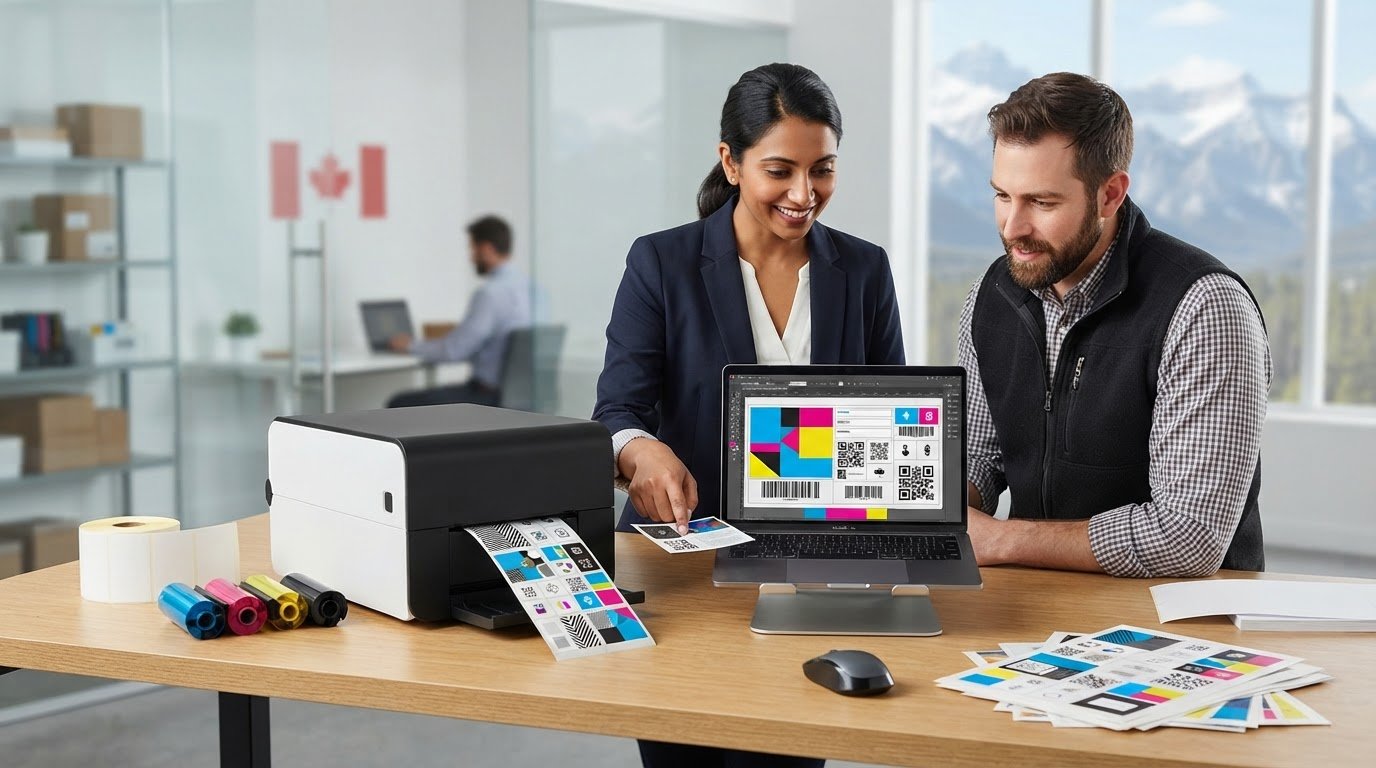
Could the label software that seems simplest today become a bottleneck as your products, data, or printer setup changes? Choosing loftware nicelabel designer pro Canada businesses can use effectively starts with more than a feature list. It means understanding how the software fits the way your team creates, updates, and prints labels.
Weigh printer compatibility and licence scope alongside design tools, barcodes, and variable data. A solution that’s too limited can add manual steps, while one that’s more complex than your workflow requires can create unnecessary overhead. The right choice depends on your label volume, data sources, printer environment, and plans for growth.
This guide explains where NiceLabel Designer Pro fits and what to assess before purchasing in Canada. You’ll learn how to map your workflow, evaluate design and data requirements, and review product and licence details against your needs. DuraFast Label Company Canada offers Loftware NiceLabel Designer Pro alongside printers and label supplies, so you can consider the software as part of your wider printing setup.
Key Takeaways
- Map your label tasks, data sources, printer setup, and team roles before deciding whether Designer Pro fits your workflow.
- Consider how label design and variable data can support consistent production, not just the printing of a finished file.
- Use sample records and existing artwork to prepare for a practical workflow evaluation.
- When assessing loftware nicelabel designer pro Canada options, review the licence scope and product details alongside your printer requirements.
- Match the complexity of your labelling needs to the functions you expect to use, avoiding both restrictive and unnecessarily complex setups.
What is Loftware NiceLabel Designer Pro and its uses?
Loftware NiceLabel Designer Pro is label-design and barcoding software for creating layouts that combine fixed content with changing data in a business printing workflow. Instead of treating every label as a finished file, a team can create a reusable layout and define where information belongs, such as product details, a barcode, or fields populated from a data source.
This approach is useful when labels need regular revisions or come in several versions. A static file may suit a one-off task, but each change then has to be managed separately. A reusable design gives the team a consistent starting point. Variable data and database connectivity can support repeat production when fields change from one label to the next. The workflow still needs to suit the business’s label tasks and printing environment.
Businesses creating packaging labels also need to consider the information their products require. The Canadian Consumer Packaging and Labelling Act is one reference for understanding the broader packaging and labelling context. Design software helps arrange content, but using it does not by itself determine whether a finished label meets every applicable requirement.
Which labelling tasks can Designer Pro support?
For a recurring label, a designer can arrange fixed elements, such as a company name or product description, alongside changing fields, such as an item identifier or batch value. Barcode design is another practical task: a barcode can sit within the layout with related text, helping staff work from a consistent design. Consider the barcode format and intended use as part of your requirements. The design tool alone does not establish standards compliance.
Database connectivity is useful when changing fields come from business records. Rather than retyping each value into a separate design, a workflow can draw on data for repeat label production. To assess whether this fits, identify where the information is stored and how your team prepares it. Include the intended printer setup in your planning, since it affects how a design moves from screen to printed label.
Who should evaluate a professional label-design tool?
Designer Pro may suit a team bringing label creation and printing in-house that needs a repeatable process. Product identification, shipping labels, and operational labelling can involve recurring layouts or changing information. A small team may want design and barcode tasks in one workflow, while staff responsible for data need to understand how records populate label fields.
Occasional one-off design with no changing data may not need a professional design workflow. Before choosing loftware nicelabel designer pro Canada, map your label tasks, data sources, printer setup, and intended licence scope. Those requirements provide a clearer basis for judging fit than feature names alone.
How Designer Pro Fits Into a Label Design and Printing Workflow
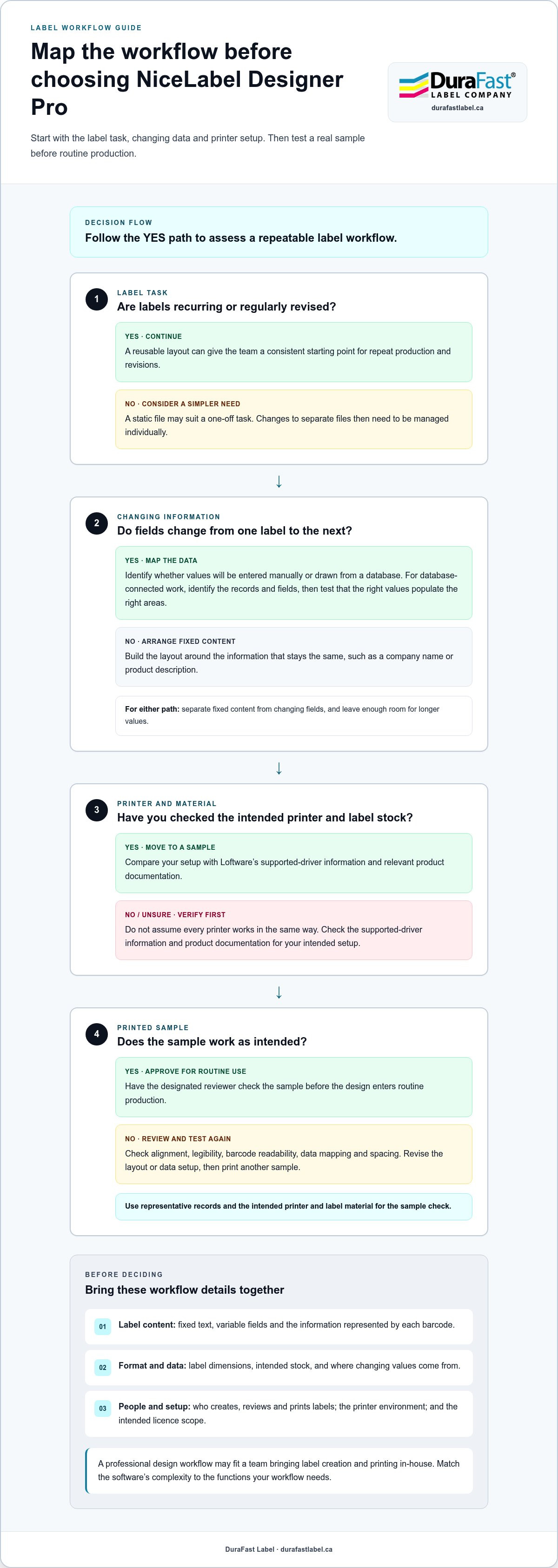
A reliable label workflow starts before anyone opens the design software. Define what the label must communicate, where changing information comes from, and which printer and stock will produce it. Then create the layout, connect or enter the required data, and validate a printed sample. This order helps reveal missing information before it disrupts routine production.
Plan the label before opening the design software
Start with a clear specification for each recurring label. Record the required wording, barcode content, physical dimensions, and intended label material. Separate information that stays the same from fields that change, such as a product identifier or shipment detail. If values come from a database, identify the relevant records and fields so the design reflects how the data is maintained.
- Content: List fixed text, variable fields, and the information represented by each barcode.
- Format: Note the label dimensions and intended stock.
- Data source: Identify whether changing values will be entered manually or drawn from a connected database.
- Responsibilities: Decide who creates the design, reviews its content, and prints approved labels.
For barcode requirements, use relevant guidance such as GS1 Canada Labeling Standards to understand identification and supply-chain considerations. Define what the label needs to do before arranging its elements.
Design, connect data, and validate a sample
With the requirements in hand, arrange fixed and variable content into a readable layout. Leave enough room for changing fields to accommodate longer values, not just the shortest example. Position the barcode and related information for their intended use. If values come from a database, test that the right fields populate the right areas of the design.
- Build the layout: Add fixed text, variable fields, and barcode content according to the label specification.
- Test representative records: Include different field lengths and values to reveal spacing or mapping problems.
- Print a sample: Use the intended printer and label material, then review alignment, legibility, and barcode readability.
- Approve the result: Have the designated reviewer check the sample before the design enters routine use.
Include printer compatibility in the evaluation. Compare your intended setup with Loftware’s supported-driver information and relevant product documentation rather than assuming every printer works in the same way. A test print can reveal differences between the on-screen layout and the result on the selected stock.
For Canadian teams evaluating Loftware NiceLabel Designer Pro, this workflow connects software fit to real label tasks, data, and printing equipment. DuraFast Label’s contact page provides a way to discuss your requirements.
Is Designer Pro the Right Fit? Assess Workflow, Team, and Printer Needs
Choosing label software is a fit decision, not a contest to select the most feature-rich option. Start with the work your team needs to complete: how involved the layouts are, how often information changes, whether labels use barcodes, and how printing is organized. Then assess the people and equipment involved. This separates functional fit, whether the workflow suits the software’s role, from licence fit, whether the purchase terms cover your intended use.
Match software capabilities to the work you actually do
Designer Pro’s professional design, barcode, variable-data, and database-connectivity functions are relevant when labels need more than static text. Consider whether you maintain a few stable designs or produce repeat labels from changing records. If your workflow also raises questions about multi-user governance or production automation, broaden the edition evaluation rather than assuming one design tool covers every operational need.
Simple workflow: A few stable layouts, limited data changes, and straightforward printing. Focus on design needs and the intended printer setup.
Repeatable workflow: Regular label runs with changing fields or database records. Assess how data connects to the design and how barcodes fit the process.
More complex workflow: Multiple team roles, broader governance needs, or production automation questions. Compare those requirements with other NiceLabel editions.
This framework is a starting point, not a verdict. A team printing recurring labels from changing records may need different functions from one producing occasional, stable designs. DuraFast’s broader NiceLabel edition comparison discusses Designer Pro alongside PowerForms and LMS, providing context for evaluating those alternatives when requirements extend beyond the core design workflow.
Check printer, data, and licence fit before deciding
List your printer models and compare them with current Loftware supported-driver information and product documentation. A printer connection alone does not establish compatibility; the specific model and driver support matter. Next, note the data sources each label depends on and how often its content changes. This helps distinguish a useful database connection from a feature your operation may not need.
Review the software purchase separately from its functional fit. For loftware nicelabel designer pro Canada, examine the Canadian product option and its licence scope, including printer count and renewal terms. Package limits and licence conditions can differ, so assess the terms for the option you’re purchasing. Keep a written summary of your tasks, printer models, users, and data needs so the product and licence are measured against the same requirements.
Preparing for NiceLabel Designer Pro Implementation
A smoother implementation starts with useful examples, not a blank screen. Before choosing or setting up Loftware NiceLabel Designer Pro, gather the files, materials, printer details, and data that reflect your day-to-day label work. These give your team a practical basis for evaluating the workflow and can reveal gaps before they affect production.
Build a practical label and printer test set
Select a representative group of existing label designs. Include their dimensions, intended materials, and any artwork or fixed wording the team needs to preserve. Note where variable data appears and collect sample records showing the range of values you expect. Avoid relying only on ideal examples. Longer text, blank fields, and varied barcode data can expose layout issues that a typical record may not reveal.
- Artwork and content: Gather current label files, required wording, logos, and examples of approved designs.
- Stock and size: Record label dimensions and the materials used for each application.
- Printer environment: Write down the make and model of each intended printer, then compare them with current Loftware documentation and supported-driver information.
- Data examples: Collect representative records, including longer values, empty fields, and different barcode content.
Consider printer type and label material together. A colour product-label workflow may call for evaluating colour label printers, while a workflow using thermal media may align with thermal label printers. These categories help frame your tests, but the specific printer, stock, and label purpose should guide the sample run.
Print the test designs using the intended equipment and material. Check more than whether the label appears on the stock: review alignment, spacing, text legibility, and whether variable values display correctly. For barcodes, assess readability using the method followed in your operation. A sample that works on screen but fails in a real print environment isn’t ready for routine use.
Set review and release responsibilities
Implementation also needs clear ownership. Decide who maintains label designs, who verifies content, and who reviews a printed sample before a change is released. Keep approved designs and their source data in known locations, with a clear way for staff to identify the current version. This reduces confusion when a label is updated or another team member needs to print it.
Set a repeatable review step for production-label changes. The reviewer can compare the revised design with its requirements, test representative records, and examine a new print sample before use. This makes small edits, such as a revised product detail or a new data field, easier to manage consistently.
These materials give your team a concrete starting point for loftware nicelabel designer pro Canada planning. DuraFast Label’s contact page is available for conversations about printer setups, label examples, and data needs.
Choose and Buy Designer Pro in Canada With a Clear Next Step
Once you’ve mapped the work, prepared sample labels, and considered your printer environment, the purchase decision becomes more straightforward. Don’t choose software based on a package description alone. Match Designer Pro’s documented capabilities and the Canadian licence details to the way your team creates and prints labels.
Use a final product-fit checklist
Bring the main requirements together before selecting a product option. This helps distinguish a good functional match from a licence that may not cover your planned use. Review the product documentation and Canadian product details for the option you’re considering.
- Label tasks: Confirm that design, barcode, variable-data, and database functions align with the labels your team produces.
- Data connections: Identify the data sources involved and how changing information will enter the label workflow.
- Printer setup: Compare your printer models with supported-driver information and compatibility documentation.
- Users and responsibilities: Clarify who creates, reviews, and prints designs, and whether your workflow raises needs for broader governance or automation.
- Licence scope: Read the selected Canadian option’s terms, including printer count and renewal details, before purchasing.
Keep functional suitability and licence suitability as separate questions. A design workflow may fit your label tasks, but the selected licence still needs to align with how your business intends to use it. Review the terms for your chosen product option rather than relying on a third-party listing.
Move from evaluation to a confident purchase
For a focused evaluation, summarize your label tasks, data sources, printer models, users, and licence requirements in one place. Include a sample label or test record that illustrates a variable field or barcode requirement. This creates a practical basis for comparing the software with your needs, whether you’re replacing a manual process or organizing label production across a team.
DuraFast offers Loftware NiceLabel Designer Pro alongside other label-design software, printers, labels, and related supplies. You can consider the software in the context of your wider printing setup, without assuming every business needs the same configuration. If your requirements extend into PowerForms or LMS, DuraFast’s NiceLabel edition comparison can help frame a broader edition review.
For loftware nicelabel designer pro Canada, use the product and licence details for the Canadian option you’re considering. Pair that review with your workflow notes, then decide whether the fit is clear or whether you’d like to discuss your requirements. A measured decision can help avoid both a tool that falls short and unnecessary complexity.
Contact DuraFast Label about NiceLabel Designer Pro to discuss your label workflow and purchase requirements.
Make Your Next Label-Software Decision With Confidence
Turn your evaluation into a decision your team can maintain. Consider not only whether a design works today, but how your label process may change as products, data, or responsibilities evolve. That longer view can help you support current needs without adding complexity for its own sake.
As you assess loftware nicelabel designer pro Canada, align the purchase details with your intended workflow and review the Canadian product option you plan to select. DuraFast Label offers Loftware NiceLabel software in Canada, along with printers, labels, ribbons, and related labelling supplies, so you can consider the software alongside your broader operation.
Bring your requirements or the questions you’re still working through to DuraFast Label. Talk with DuraFast Label about your NiceLabel Designer Pro plans.
Frequently Asked Questions
What is Loftware NiceLabel Designer Pro used for?
Loftware NiceLabel Designer Pro is used to create and manage label designs for business printing. Teams can lay out text and other label elements, then prepare designs for recurring use instead of editing a separate file each time. For example, a company might maintain a consistent product-label layout while updating item details as needed. Its value depends on how well those design tasks match the team’s printing process.
Can NiceLabel Designer Pro connect to a database for variable data?
Yes. Database connectivity and variable-data functions are documented capabilities. They can help populate label fields from records, such as item codes or descriptions, instead of requiring staff to type each value into the design. Before relying on this workflow, identify the required fields and test representative records to check that the right values appear in the right places. The database and workflow determine how useful the connection will be.
Does NiceLabel Designer Pro support barcode label design?
Yes. Barcode design is among Designer Pro’s documented label-design capabilities. A team can include a barcode in a label layout and associate it with relevant product or operational information. The software does not, by itself, establish that a barcode meets every customer, trading-partner, or industry requirement. Define the barcode’s intended use and test printed samples with the scanning process used in your operation.
How many printers does a NiceLabel Designer Pro licence support?
The supported printer count depends on the specific licence option, so there isn’t one number that applies to every Canadian purchase. Review the product and licence details for the selected option rather than relying on another retailer’s package description. For loftware nicelabel designer pro Canada purchases, include the printers you plan to use in your evaluation and compare their models with supported-driver information.
Is NiceLabel Designer Pro cloud-based or installed locally?
Designer Pro is associated with Loftware’s on-premise NiceLabel software, while Loftware Cloud is a separate cloud-based solution. These are different product approaches. Consider where your team needs to work with label designs and how your organization manages its software environment. Review the technical and licensing requirements for the option you’re considering before planning deployment.
How is NiceLabel Designer Pro different from PowerForms or LMS?
Designer Pro is positioned as a professional label-design option, while PowerForms and LMS are other NiceLabel editions to consider as needs broaden. The right comparison depends on the functions and level of workflow management your organization requires, not just the edition names. If your evaluation raises questions about advanced forms or wider label-management needs, DuraFast’s NiceLabel edition comparison can help you explore the options side by side.