Digital Color Label Printer Costs and Business Value
9th Nov 2026
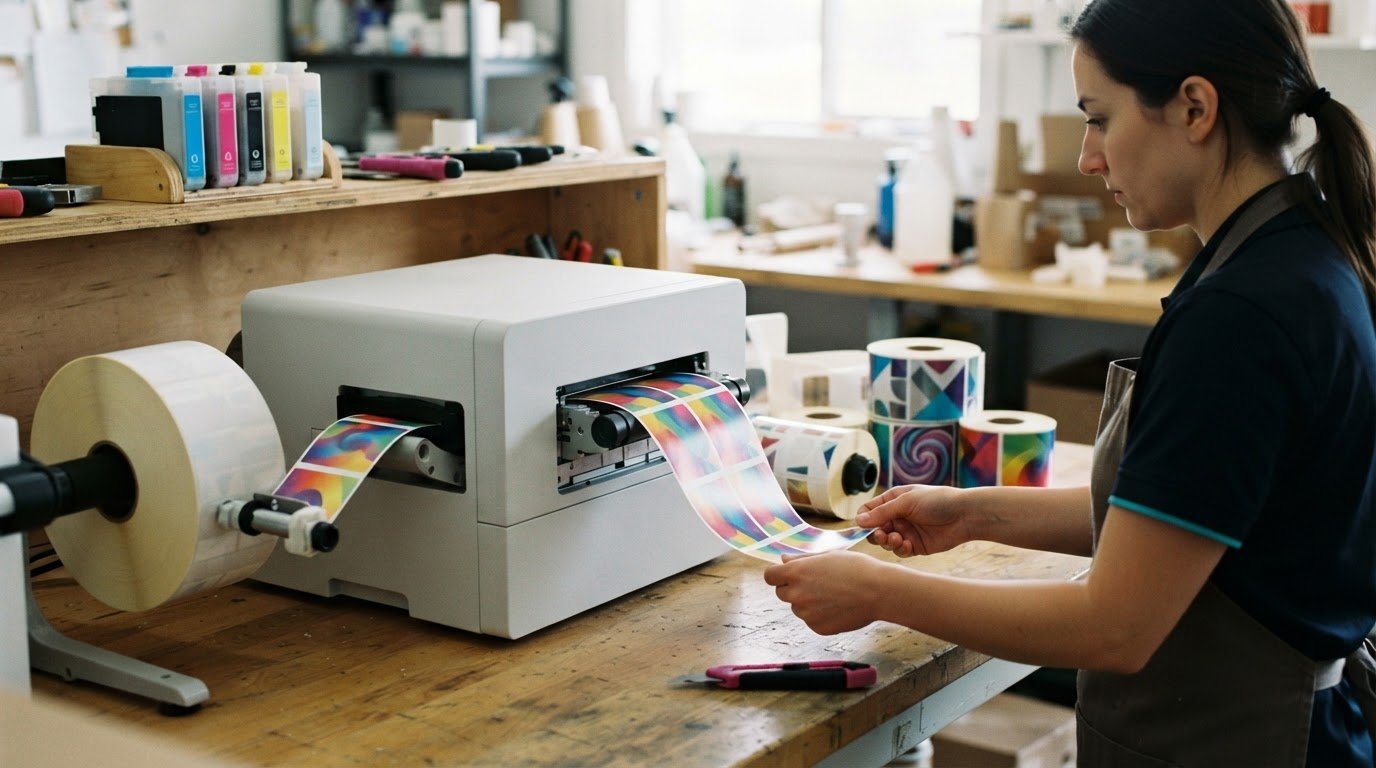
A digital colour label printer isn’t justified by colour alone. Justifying a digital colour label printer investment to management means showing how printing in-house could support consistent branding, short runs, faster job changes and less reliance on pre-printed stock. The strongest case ties those operational benefits to your business’s actual costs and workflow.
It’s reasonable to focus on the purchase cost, but the decision also involves print quality, ink use, label materials, inventory and the time needed to prepare each job. Digital printing can make small or changing orders easier to manage, while long runs of stable designs may call for a different cost comparison.
This article explains how digital colour label printing affects brand consistency, print costs, changeovers, print quality and colour matching. You’ll also learn which factors shape the business case, where digital printing can offer practical value, and how to assess the investment against your production needs, not just the printer itself.
Key Takeaways
- Build the business case around brand consistency and the production challenges colour printing can address, not just the equipment purchase.
- Compare digital and analog printing against your actual run sizes and design stability to understand where each approach may be more cost-efficient.
- Factor in ink coverage, label materials, inventory and storage when assessing the cost of short and medium print runs.
- Account for plate-free setup and quicker job changes when evaluating the operational value of digital printing.
- Consider print quality and colour-matching needs alongside workflow and label conditions when choosing a printer.
Brand recognition through consistent colour use
Customers see a brand across shelves, shipments and product variants, so consistent colour helps labels look like part of the same family. For example, a producer selling tomato sauce and salsa can use a shared red accent while keeping each product’s name and flavour easy to distinguish. The labels feel cohesive without looking identical.
Colour can also shape perceptions before someone reads the full label. Deep green may suggest herbal ingredients on a tea package, while bright orange can distinguish a spicy flavour from a mild one. These associations aren’t universal, so management should consider the audience, product category and existing brand identity before changing a palette.
Consistency is especially useful when extending a brand. When a company adds a new size, flavour or product line, a familiar colour system can connect it to established products. One practical approach is to keep core brand colours consistent and assign a distinct secondary colour to each variant. This makes the relationship visible while helping customers tell products apart.
Digital printing can reproduce colour from a supplied design, but the final result also depends on the label material, ink and print settings. Assess quality by comparing a printed sample with the approved artwork under the lighting where customers will see it. Record the chosen material and settings as a reference for repeat production.
Colour matching matters when the same artwork appears on different materials or label sizes. A shade may look different on a matte surface than on a glossy one, even when the artwork file is unchanged. Print a sample on the intended stock, review it beside existing packaging and approve a reference before larger runs.
The application matters, too. A specialty card-grading label needs clear visual identification, while consumer packaging may rely more heavily on colour-coded product variants. For card-grading use, inkjet card-grading labels illustrate how label purpose can influence layout and colour decisions.
What implementation, training, maintenance and downtime risks should management consider? Plan for artwork setup, staff practice with the print workflow, routine upkeep and a response if production pauses. A sample run can reveal workflow issues before the printer becomes part of a time-sensitive production schedule.
For a management case, connect each colour decision to a clear business need: recognizable branding, product differentiation or consistent packaging across an extension. Then explain how sample approval and documented print settings help teams reproduce the intended result in future production.
Digital versus analog high-volume cost efficiency
At high volumes, the right method depends on design stability, production scale and the full cost per usable label. Compare workflow, waste and inventory alongside print quality before deciding.
Workflow Efficiency and Label Waste
Workflow efficiency means producing the required label format with fewer setup steps, unnecessary stock and production delays. Digital printing avoids printing plates, reducing plate-related make-ready waste and simplifying changes between designs. This matters when orders include several label versions or demand shifts after a print run. Label stock accounts for 70-90% of label cost, so waste reduction deserves attention. On-demand printing can also reduce excess finished-label inventory and its handling and storage costs.
For example, a manufacturer updating ingredients or packaging artwork can print the revised design without building old pre-printed labels into its inventory plan. At high volume, however, savings depend on actual material use and run frequency. Compare accepted labels, setup waste and leftover stock across digital and analog methods.
Operator Efficiency and Process Control
Operator efficiency means preparing, running and changing jobs consistently; process control makes those tasks repeatable. A digital workflow can simplify switching between label formats because it doesn’t require printing plates. Operators still need to manage artwork files, print settings, label stock and quality checks. A clear process helps prevent errors, such as loading the wrong format for a product batch.
For production teams handling stable, high-volume labels, record approved files and settings by product. Then define who can release changes and how printed output is checked. This supports consistency without assuming automation removes the need for trained operators.
In-House Printing Versus Outsourcing
In-house digital printing brings label production into your operation; outsourcing leaves it with an external printer. For organizations considering outside fulfillment, working with commercial print providers such as קמפוס לדפוס דיגיטלי demonstrates how external shops deliver specialized print capabilities without the need to manage internal equipment. Printing in-house can give teams more control over timing and short-run changes, while outsourcing avoids running an internal print workflow. Compare total costs, including equipment, ink, stock, labour, waste, storage and outsourced label charges. Quality depends on the artwork, material, print process and controls used for each job.
What does a digital colour label printer cost in Canada? There isn’t one figure that suits every operation. Budget for the printer configuration and expected use, then include ink, label stock, operator time and maintenance. A cost analysis based on your designs gives management a more useful comparison than purchase cost alone.
For stable designs produced in millions of labels per year, analog printing may offer a lower per-label cost. Its practical minimum is typically several thousand labels, while digital printing avoids plates and can support changing designs. Compare each method using the same label format, material and quality requirements. To discuss the workflow and equipment needs behind that comparison, share your label printing requirements.
Economics of short and medium print runs
Digital printing can suit smaller label jobs when designs vary or demand is uncertain. Its economics depend on job quantity, artwork, ink coverage and label material. When justifying a digital colour label printer investment to management, focus on how those factors affect your own production plan.
Smaller Runs and Product Variations
A digital printer can produce a 50-label product test without plate-related minimum quantities. This lets a business assess a new product label before committing to a larger production order. Digital printing can also produce unique content on individual labels within the same run, which can support distinct product versions or variable details.
Seasonal packaging is another case to assess. A business can produce labels closer to anticipated demand rather than storing a large batch that may no longer suit the product. Digital printing becomes increasingly competitive below approximately 5,000-15,000 labels per job, depending on label size, ink coverage and substrate. It is a strong fit for short-run jobs typically under 5,000-10,000 labels. These ranges overlap because the break-even point depends on the job.
Assessing the Business Case
Compare projected program costs with potential savings from inventory, storage and unused labels. According to the Government of Canada, a basic return-on-investment assessment compares projected program costs with potential cost savings. Include ink, label material and labour in the calculation, along with any costs associated with holding finished stock.
Use representative artwork to assess ink use, since coverage varies between designs and printers. For example, compare a text-heavy label with one containing large colour areas. Review electronic proofs for content and layout, then assess printed samples on the intended material. This gives management a more grounded comparison than a generic estimate and ties the investment case to actual jobs, not assumptions about every run.
Supplier Setup and Trial Runs
Changing suppliers can involve a quote, a site visit with quality audits and trial runs. The time required largely depends on how quickly those steps are completed. A trial or second-source arrangement can test a supplier while preserving the current relationship.
Trial costs may be absorbed or charged upfront, then credited after a supplier wins the business. Include those terms in the comparison. An industrial operation can use a controlled trial to assess the actual label material, application and quality requirements before shifting recurring work. That evidence can help justify a digital colour label printer investment to management in the context of the production environment.
Reduced setup costs and faster job changeovers
Digital label printing can make artwork changes easier to manage by reducing some setup steps. That difference matters when demand shifts, designs change or production schedules include several products.
Digital setup can take minutes, while analog setup can take hours for plate mounting and ink-station preparation. A new flexographic plate can take days to weeks to obtain, delaying an artwork update. With digital printing, teams can prepare a revised file and move to the next job without waiting for replacement plates.
How much time can on-demand label printing save compared with ordering preprinted labels? Digital setup may take minutes, while analog setup can require hours, and a new flexographic plate can take days to weeks. Total time saved depends on existing ordering, approval and delivery steps, as well as production scheduling.
On-demand printing also makes label design changes easier to manage. If a business changes a product name, packaging image or other label content, it can produce the revised version as needed. This reduces the risk of holding preprinted inventory that becomes obsolete after a design change, regulatory update or product discontinuation.
For example, a producer can print a revised batch label after an approved artwork update instead of using stock with the old design. A practical workflow separates artwork approval from print release: approve the electronic file, confirm the correct version, then produce labels for the current volume. This helps prevent outdated files from returning to production.
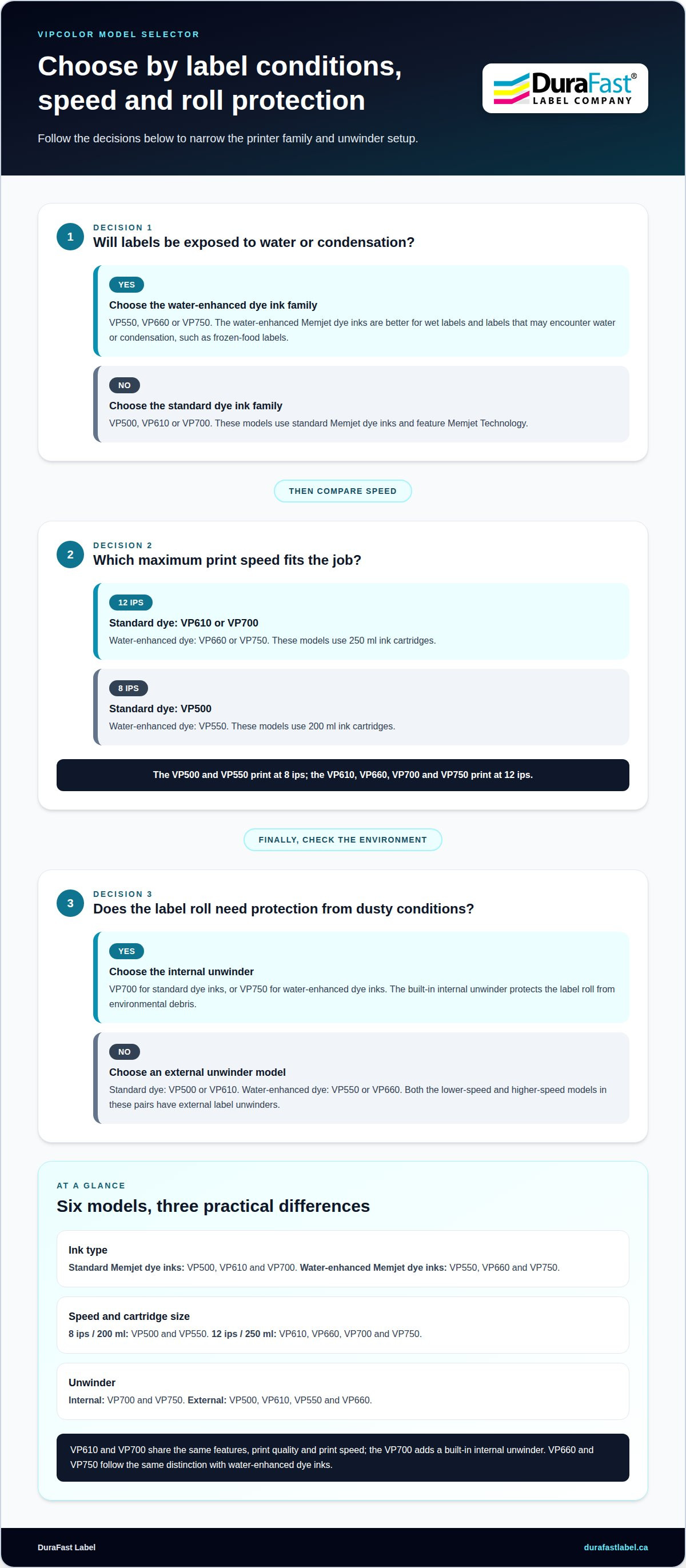
What features should businesses compare when choosing a digital colour label printer? Compare print speed and quality, ink type, supported label materials, job volume, roll handling and compatibility with your existing workflow. A printer suited to occasional short runs, for example, may not fit a production line with frequent, larger jobs.
How can you calculate return on investment and payback? Estimate annual savings from reduced setup, waste, obsolete stock, storage and outsourced label costs, then subtract annual ink, material, labour and maintenance costs. Divide the printer investment by the resulting annual net savings to estimate the payback period. Use actual job data, including artwork changes and run frequency, rather than assuming every label job saves equally.
Management can assess operational value by reviewing representative jobs: a repeat design, an updated label and a short-run product variant. Compare preparation time, usable output and leftover stock for each method. The results show where faster digital changeovers support current demand and where stable, high-volume designs need a separate cost comparison.
Digital printing eliminates printing plate and tooling costs while enabling rapid job changeovers. Its plate-free process removes setup steps and can improve turnaround times for proofs or finished products.
Print quality and colour matching
Print quality determines whether label text, graphics and colour look clear and consistent across packaging. Digital CMYK printing uses four base colours: cyan, magenta, yellow and black, also called key. These inks combine to create a range of colours, but may not reproduce every shade in a brand palette exactly. Management should assess printed samples, not judge colour from a screen alone.
The Pantone Matching System provides a reference for specific colours. Standard CMYK digital printing can account for 55 percent of Pantone colours, while seven-colour process printing can achieve up to 98 percent of the Pantone spectrum. Seven-colour printing adds three inks to CMYK, including violet and orange or green. These figures describe colour range, not a promise that every Pantone shade will match precisely on every label material.
For a brand-critical shade, compare a printed sample with the approved reference. Review it on the intended label stock, since the material and surface can affect how colour appears. A blue printed on glossy packaging, for example, may look different from the same file printed on a matte label. Approve the sample under consistent lighting before using it as the production reference.
Colour matching also depends on how artwork is prepared and managed. Keep a controlled master file for each design, record the selected stock and use the approved version for later runs. If a supplier or material changes, print a fresh sample and compare it with the existing reference. This helps identify visible differences before a full production run reaches packaging.
Assess more than colour. Check small text, fine graphics, barcodes and any required variable details at their actual printed size. For example, inspect a product label at normal viewing distance and confirm key information remains legible. Review a sample in its intended application, because label shape and placement can affect how the design reads on the package.
To evaluate a printer for your artwork, prepare representative label files with brand colours, fine details and typical coverage. Print them on the intended material, then compare colour, clarity and consistency against your current packaging. Discuss your colour label printing requirements and the label samples that matter to your production workflow.
Allow time for printer setup and tuning before judging output from a production run. One commenter reported achieving excellent prints by day 4 after printer setup and tuning. That experience is a useful reminder that early samples may not represent the printer’s settled result, but it is not a guarantee for every machine, material or artwork. Keep the approved reference available during evaluation, and review the tuned output on the intended stock under consistent lighting. If print quality changes during setup, compare a fresh sample with the reference before approving the design for production.
DuraFast Label Company Canada: Dymo LabelWriter label printers
DuraFast Label Company Canada offers label printing options for different business requirements. For in-house colour product labels, its VIPColor Label Printers and Afinia Label Printers are relevant options to consider alongside the label format, artwork and production workflow.
Start with the job when choosing a printer: consider whether labels need colour, which materials they use and how they fit your operation. Matching those requirements to a suitable printer category keeps the equipment decision grounded in practical production needs.
Contact DuraFast Label Company Canada to discuss your label printing requirements and printer options.
Turn the business case into a practical next step
Move from analysis to a decision by connecting the proposed printer to a defined production need. A clear case for justifying a digital colour label printer investment to management should explain the intended workflow and decision criteria. This gives stakeholders a shared basis for assessing whether in-house colour printing suits the operation.
DuraFast Label Company Canada offers VIPColor Label Printers and Afinia Label Printers. These options provide a starting point for discussing equipment against your label requirements, production plans and preferred workflow, rather than treating the purchase as a standalone decision.
Bring your label examples and operational priorities into that conversation. A focused discussion can help clarify which printer category aligns with the job and what information management needs to make its decision. Contact DuraFast Label Company Canada to discuss your label printing needs and take the next step with confidence.
Frequently Asked Questions
What are the Advantages of Digital Printing?
Digital printing makes it practical to produce multiple label versions without ordering a separate plate set for each design. For example, a beverage producer could keep the same core layout while varying flavour names or batch details. This flexibility can simplify product launches and limited packaging editions, especially when artwork changes faster than a large stock of preprinted labels can be used.
What are the costs of operating a colour-label printer?
Operating costs include ink, label stock and consumable components, which may include the printhead and waste-ink collection tank. Ink use varies with design coverage, so a solid-colour graphic and a mostly white label won’t consume ink alike. Printer design matters too: some models have replaceable printheads, while others use permanent printheads. Track actual jobs and materials to estimate representative operating costs.
What are the ongoing costs of digital label printing, including ink, labels, maintenance, and service?
Plan ongoing costs in separate categories: ink and label material for each job, routine upkeep, and service or component replacement based on printer design. A permanent printhead may eventually require service-centre attention as components wear; a replaceable printhead follows a different replacement path. Review ink coverage and stock consumption from representative runs, then use those records to build an operating budget.
What production volumes and label quantities make buying a digital label printer cost-effective?
Entry-level colour printers are suitable for occasional production or workloads below 500 labels per day. Cost-effectiveness still depends on how often jobs recur, whether designs change, and how much finished stock might otherwise sit unused. A business printing one-off prototypes faces a different case from one producing several repeat product variants each week. Use your job mix and stock needs to assess the fit.