Desktop Rotary Die Cutting and Finishing for Digital Labels
3rd Nov 2026
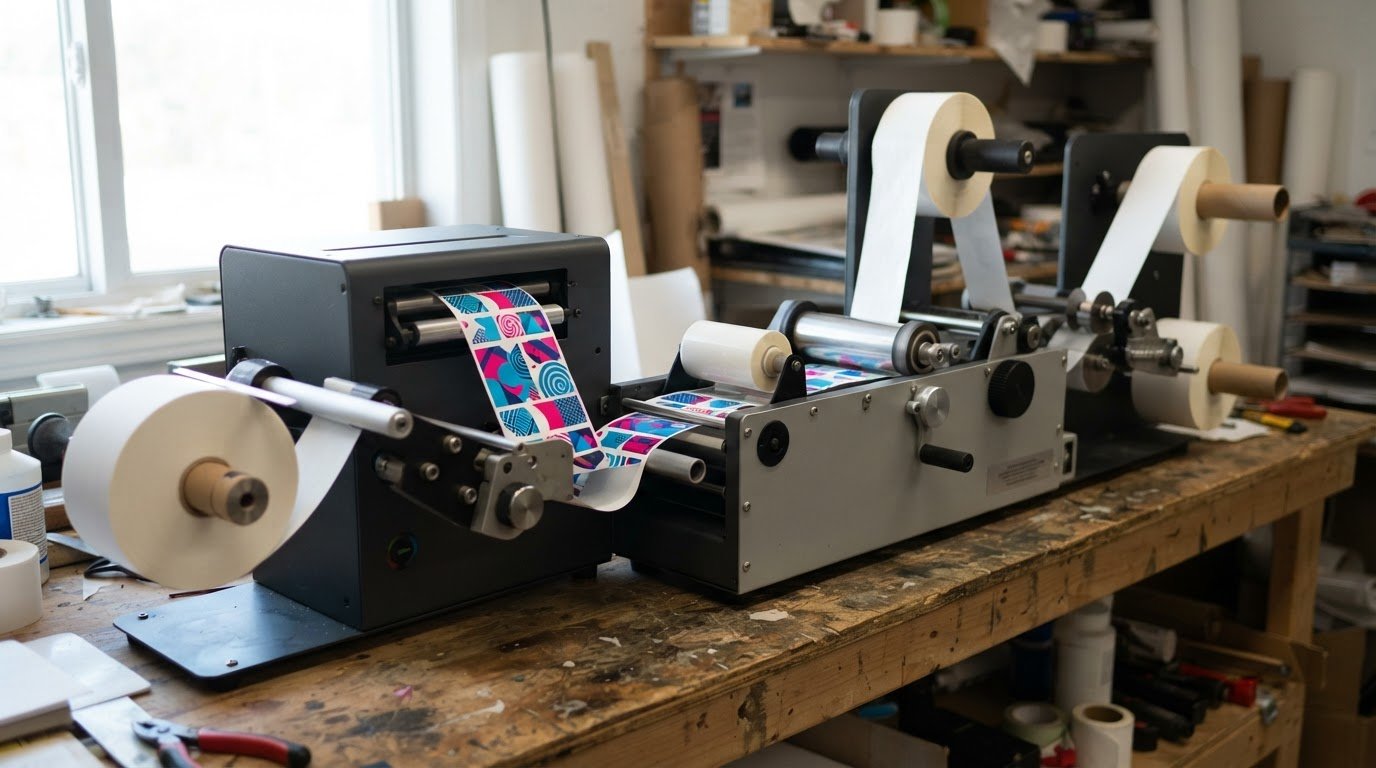
Inline rotary finishing can turn digitally printed stock into finished label rolls in a continuous workflow. Paired inline with the Afinia L901 Digital Label Printer, the Afinia DLP-2200 can produce more than 25,000 full-colour 3×4-inch labels per hour, showing what a desktop digital label finisher with rotary die cutting can achieve when printing and finishing work together.
Throughput is only one factor when choosing a system. Roll capacity, cutting width, finishing steps, floor space, power requirements, and cut precision all affect how well a machine fits your label work and production environment.
This guide explains how inline printing and rotary die cutting work together, then covers roll handling, lamination, waste removal, slitting, and rewinding. It also highlights the dimensions and operating specifications to compare, so you can assess the whole workflow rather than focus on speed alone.
Key Takeaways
- Plan waste-matrix removal, slitting and rewinding together so finished rolls suit your next production step.
- Compare incoming, laminate and finished-roll capacity to match roll handling to your label workflow.
- Assess the finisher’s footprint, weight and power requirements before planning its place in your production area.
- Balance finishing speed with die-cutting width, die dimensions and adjustment range to suit the labels you produce.
Lamination, waste removal, slitting, and rewinding
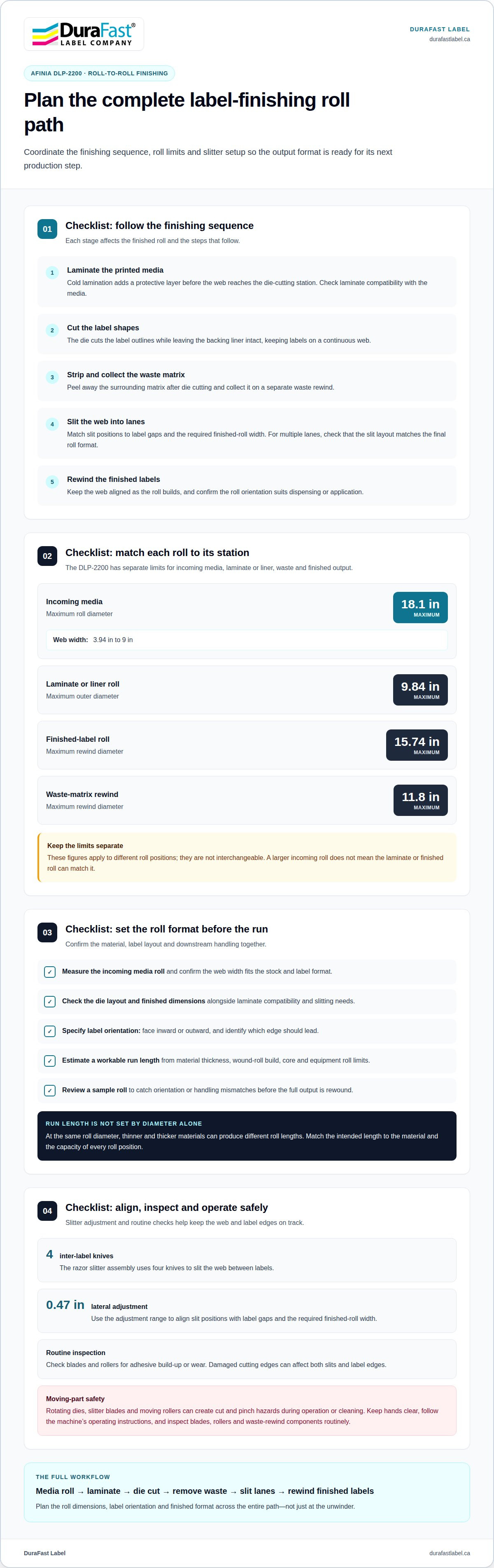
A finishing line combines several steps after printing: laminate the web, cut label shapes, strip away waste, slit lanes, then rewind. On the Afinia DLP-2200, roll limits and slitter adjustments help determine how that sequence fits production demand.
Lamination and Die Cutting
Cold lamination adds a protective layer before the web reaches the die-cutting station. The process is straightforward: laminate the printed media, cut the label shapes, strip away the surrounding matrix, then slit the web into narrower lanes. Check laminate compatibility, finished label dimensions, and die layout together. For example, a design with multiple lanes needs slitting that matches the final roll format.
A desktop digital label finisher with rotary die cutting can bring these steps into one workflow. The die cuts the label outlines while leaving the backing liner intact, allowing the surrounding matrix to be removed afterward. This matters when labels need to stay on a continuous roll for dispensing or later application.
Waste Removal and Roll Finishing
After die cutting, the waste matrix is peeled away and collected on a separate rewind. The DLP-2200 can rewind waste to a maximum diameter of 11.8 in. Its razor slitter assembly has 4 inter-label knives, with 0.47 in of lateral adjustment. These settings help operators align slit positions with label gaps and the required finished-roll width.
Plan the sequence before production: remove the matrix, set the slitter position, and rewind the finished labels. A clean cut and steady web tension help keep labels aligned as the roll builds. As part of routine upkeep, inspect blades and rollers for adhesive build-up or wear. Damaged cutting edges can affect both slits and label edges.
Media and Laminate Capacity
Roll capacity affects how often operators reload media or change laminate. The DLP-2200 accepts a maximum media roll diameter of 18.1 in, while laminate or liner rolls have a maximum outer diameter of 9.84 in. Finished labels can rewind to a maximum diameter of 15.74 in. Compare each limit with the roll dimensions used in your production workflow.
These capacities describe different positions on the machine, not one interchangeable roll limit. A larger incoming roll does not mean the laminate roll or finished roll can match it. Match roll dimensions to each station, then consider how the finished format supports storage and downstream use. A separate application may call for inkjet card grading labels, with roll finishing planned around its own label format.
Die, blade, maintenance, and consumable costs vary with the die design, blade wear, laminate, and materials used per run. Compare these cost drivers with job length and changeover frequency instead of assuming a fixed operating cost.
Rotating dies, slitter blades, and moving rollers can create cut and pinch hazards during operation or cleaning. Keep hands clear of moving parts, follow the machine’s operating instructions, and routinely inspect blades, rollers, and waste rewind components.
Roll capacity and recommended roll length
Roll diameter and web width set practical limits for roll-to-roll finishing. The Afinia DLP-2200 accepts media rolls up to 18.1 in in diameter and web widths from 3.94 in to 9 in. Match both measurements to the stock and label format before planning a production run.
Maximum roll diameter does not determine the recommended roll length. The length that fits depends on media thickness, the wound-roll build, the core, and the equipment’s roll limits. At the same diameter, thinner material can produce a different roll length than thicker material. Choose a working length that suits these factors and your changeover plan.
Consider the machine’s separate roll positions, too. Incoming media, laminate or liner, and finished output each have their own capacity limits. A roll that fits the unwinder may not suit another station. For the DLP-2200, its maximum media diameter is 18.1 in; confirm that the complete input-to-output sequence suits the planned stock.
For VR240 desktop roll-label finishing, assess the same workflow before choosing a roll length: identify the input roll, finishing steps, cutter path and required output format. Don’t infer capacity from the desktop label alone. The material, label layout and finished-roll handling all affect whether a chosen roll length works for a particular job.
In roll-to-roll label cutting, the web feeds from an input roll through the cutter and winds into a finished roll. This continuous path makes accurate alignment and stable web movement important. Longer runs can reduce roll changes, provided the input and output rolls fit their positions and the finished labels are manageable for the next step.
Roll direction affects how labels present during dispensing or application. Before production, specify whether labels should face inward or outward and which edge should lead. Match the winding setup and label orientation to the downstream dispenser or application process. Reviewing a sample roll can reveal mismatches before the full output is rewound.
Use this sequence to settle the format: measure the media roll, confirm web width, set the desired label orientation, then estimate a workable run length from material and roll limits. For example, a 9 in web still needs to fit the cutter path and finished-roll handling plan. Recheck the setup when changing stock or label layout.
Capacity planning connects machine fit with daily production needs, from roll changes to storage and dispensing. To discuss label formats and finishing needs alongside your label production requirements, use the next step that best suits your workflow.
Machine dimensions, weight, and power
A digital label die-cutting machine needs more than a clear worktop: plan for its full footprint, roll handling, electrical supply, and operator access. The Afinia DLP-2200 measures 111.5 in wide, 65.35 in high, and 28.35 in deep, and weighs 1,474 lbs.
Those dimensions describe a substantial rotary die-cutting machine, not a compact desktop unit. Compare the machine’s full width and depth with the installation area, allowing space to load media and remove finished rolls. Check access routes, doorways, and floor placement before delivery. The machine’s weight affects how it can be moved and positioned.
Power planning matters just as much. The DLP-2200 can run on 220 V at 6 A or 110 V at 12 A. Match the supply to the selected configuration and plan the electrical connection before installation. Its power specification is a practical site-planning criterion, not a basis for assuming other machines use the same supply.
Rotary, laser, and flatbed systems cut labels in different ways. A rotary die uses a rotating cylinder and physical die as the web moves through the machine. Laser cutting uses a focused beam and can follow programmed shapes, while flatbed cutting holds the material flat as a cutting head moves across it. The right method depends on the label material, design, and production workflow.
Which desktop digital label finishers use rotary die cutting? The Afinia DLP-2200 is the rotary finisher identified for this workflow. Its flexible steel dies cut label shapes as the material passes through the machine.
Workspace, power, ventilation, and software requirements vary by machine and finishing process. For the DLP-2200, allow for its stated footprint and weight, and provide either listed power configuration; plan ventilation around the materials and operating instructions, while software must support the print-and-cut workflow.
Waste removal and sensor placement also affect setup. The DLP-2200’s web path needs room for the operator to access the material and waste matrix without obstructing machine movement. Keep the work area organized so labels, tools, and rolls don’t interfere with loading or operation.
Before selecting a finisher, map the room and the production sequence. Mark the machine’s 111.5 in width and 28.35 in depth on a floor plan, then account for roll loading, output removal, and operator access. Confirm that the chosen power supply matches the machine’s 220 V at 6 A or 110 V at 12 A configuration.
Treat the selected electrical option as part of the installation plan, rather than leaving the decision until the machine is in place. The Afinia DLP-2200 can run on 220V at 6A or 110V at 12A, so confirm which configuration will be used and make sure the available supply corresponds to it. Coordinate that check with the rest of the site preparation, including the machine’s position and the route for loading and unloading rolls. Keeping the power choice clear before setup helps avoid confusion during installation and makes the planned work area easier to assess.
Maximum die-cutting speed and precision
Finishing speed affects how quickly printed stock becomes usable label rolls. The Afinia DLP-2200 has a listed finishing speed of 30-60 ft/min, so compare its output with job requirements and cutting accuracy.
Cutting Speed
The DLP-2200’s finishing speed range is 30-60 ft/min. This describes web movement through finishing, not a guaranteed count of labels per minute. Label size, layout, material handling, and finishing setup affect how much finished output a run produces.
When evaluating label production, compare machine speed with the print workflow and job format. A web with several labels across its width can yield a different label count than a single-lane layout at the same speed. Review representative jobs, including label dimensions and spacing, instead of estimating output from line speed alone.
Finishing Speed and Capacity
Maximum speed matters only when the cut remains aligned and the web moves consistently. On the DLP-2200, the die head has 1.97 in of lateral adjustment, and maximum die-cutting width is 8.5 in. These specifications help define setup flexibility across web layouts, while the actual die and label design determine the cut pattern.
Precision depends on matching the die to the artwork and keeping the web correctly positioned during cutting. Before a roll-to-roll run, align the die, compare the label outline with the printed image, and inspect a sample. Confirm that the cut separates the label shape without cutting through the backing liner.
A practical capacity review compares finishing speed, usable labels per repeat, and job length. For example, a multi-lane format carries more label shapes across each repeat than a single-lane format, but total output still depends on the run and setup. Include the job layout when estimating production volume.
Die dimensions also define what the finisher can cut. The DLP-2200 accommodates flexible steel dies from 5.5 in to 14.17 in, with a maximum die-cutting length of 14.17 in. Its 18-inch magnetic cylinder holds the flexible steel die. Match the die’s dimensions and repeat to the label layout before scheduling production.
To assess precision for a new job, check a sample at the intended speed, then inspect cut alignment, label edges, and liner integrity. If the sample shows drift, review web tracking and die positioning before running the full roll. A controlled setup helps balance speed with consistent label shapes and usable output.
Inline digital label printing and rotary die finishing
Inline printing connects a label printer directly to rotary finishing, moving printed web into cutting without a separate finishing handoff. Paired inline with the Afinia L901 Digital Label Printer, the Afinia DLP-2200 can produce more than 25,000 full-colour 3×4-inch labels per hour.
That figure describes a specific pairing and label format, not every job. Label dimensions, layout across the web, print settings, and finishing setup all affect usable output. The DLP-2200 supports web widths from 3.94 in to 9 in, giving the production layout a defined range for planning. Check that the printed web and finishing setup match before running the full job.
What label printers and materials work with desktop rotary finishers? The documented inline pairing here is the Afinia L901 Digital Label Printer and DLP-2200. The DLP-2200 accommodates flexible steel dies and web widths from 3.94 in to 9 in; match the media and print web to those specifications and the selected die.
Inline operation relies on smooth web movement between printing and cutting. Load compatible media, align the printed output with the die, and establish consistent web tension through the finishing path. Inspect a sample for registration, cut position, and label shape before continuing. If the artwork drifts against the cut line, correct the alignment before producing the rest of the roll.
Print resolution and print speed describe printer output, while finishing speed describes a separate part of the workflow. Those are printer-output specifications, not the same measure as finishing speed. Compare the printer and finisher settings as one workflow; if their web movement is mismatched, output may require pauses or setup changes.
Rotary finishing adds a flexible steel die to the inline process. The DLP-2200 has a maximum die-cutting width of 8.5 in, accepts dies from 5.5 in to 14.17 in, and has a maximum die-cutting length of 14.17 in. Its 18-inch magnetic cylinder holds the die, so select a die that suits the label repeat and printed layout.
For production planning, separate advertised capacity from the output a specific job needs. More than 25,000 full-colour 3×4-inch labels per hour applies to the L901 and DLP-2200 inline pairing. Confirm the intended web width, material feed, die dimensions, and print-to-cut registration in a sample run. To discuss an inline label workflow, contact the team about your printing and finishing requirements.
An estimated 25-30% of jobs in the U.S. label-printing industry are run lengths of 5,000 linear feet or less. This provides context when planning an inline setup for a shorter run.
DuraFast Label Company Canada: VIPColor Label Printers
DuraFast Label Company Canada offers VIPColor Label Printers for businesses planning colour label production alongside a separate finishing workflow. The VP610 prints at 12 ips and uses 250 ml cartridges; the VP500 prints at 8 ips and uses 200 ml cartridges. Both have external label unwinders.
For wet labels or labels exposed to water or condensation, the VP550 and VP660 use Memjet water-enhanced dye inks. The VP550 prints at 8 ips with 200 ml cartridges, while the VP660 prints at 12 ips with 250 ml cartridges. The VP700 and VP750 have internal unwinders, which protect label rolls from environmental debris in dusty settings.
Compare printer speed, ink type, and unwinder design with your print-and-finish workflow. To explore VIPColor Label Printers for your production needs, visit DuraFastLabel.ca or contact DuraFast Label Company Canada.
Plan the Next Step for Your Label Workflow
Your next decision is how printing and finishing fit your label work, from the materials you use to the formats you need to deliver. Treat the finisher as one part of the production plan: a desktop digital label finisher with rotary die cutting needs to suit your printer, stock, and workflow. When navigating operational changes and equipment investments, business leaders looking for strategic perspective can also turn to Charlie Whalley Coaching for executive and leadership support.
DuraFast Label Company Canada offers VIPColor and Afinia Label Printers. If you’re comparing printers for an existing finishing setup or planning a connected workflow, consider how your print requirements affect the choice. Start with a clear picture of your labels, materials, and production priorities rather than one specification in isolation.
Bring those requirements together and take the next step at your pace. Discuss your label printing needs with DuraFast Label Company Canada, and move forward with a workflow that supports your production goals.
Frequently Asked Questions
What is a desktop digital label finisher with rotary die cutting?
The term describes a label-production setup that combines digital printing with roll finishing using rotary cutting. It does not specify one standard machine size or configuration. To assess whether a system fits your Canadian business, decide whether printing and finishing will be separate or linked, then consider workspace, typical jobs, and how you’ll use finished rolls.
What are the specifications and cutting speeds of desktop rotary label finishers?
When comparing specifications, ask what each figure measures and which configuration it applies to. Also consider supported media, compatible die formats, output handling, and power requirements. Use speed figures to narrow the options, then assess a machine against a representative label job. Base the layout and materials on your actual production needs, not an assumed standard format.
Where can Canadian businesses buy or service desktop rotary label finishers?
Canadian businesses can purchase label printers through DuraFast Label Company Canada’s online store. Plan service around the exact equipment model, its warranty terms, and maintenance documentation. Keep these details with the purchase records so the applicable service route is clear. Purchasing equipment and arranging service are separate considerations, so review both for the specific model.