Clear Gloss Inkjet Label Rolls in Canada: Prices and Sizes
27th Oct 2026
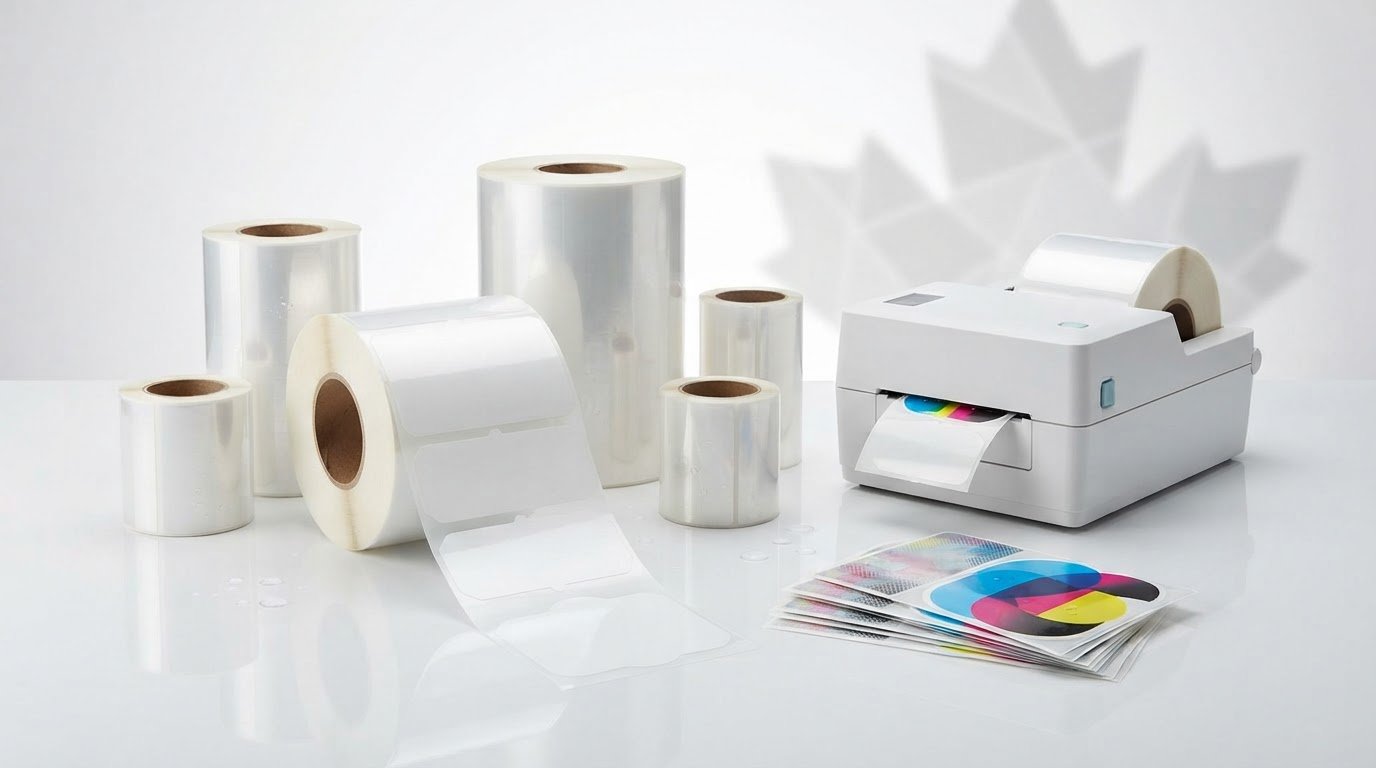
For clear gloss inkjet label rolls in Canada, start with label size, roll construction and printer fit. Clear gloss label stock can provide a shiny finish, while the right format depends on the printer and application. The right roll depends on how its dimensions and adhesive suit your printer and application.
Choosing clear gloss inkjet label rolls takes more than matching a shiny finish to your product. Roll width, core size and outside diameter determine whether a roll fits the printer, while the format affects how you print and apply labels. Because clear stock shows the surface beneath it, the artwork and background colour matter too.
This guide explains the material and adhesive, the roll specifications to compare, and the factors that shape Canadian-dollar pricing without treating one format as right for every job. It also covers continuous and pre-sized formats, so you can narrow your options based on your printer and production needs.
Key Takeaways
- Plan artwork for a transparent surface: standard inkjet inks and laser toner aren’t opaque, so the background can affect how colours appear.
- Match the permanent adhesive to the label’s surface and application conditions, especially when labels will encounter water or chemicals.
- Before choosing a roll, compare printer width, core, outside diameter and sensor compatibility to support reliable feeding.
- Use the label format and perforation to suit how you print, separate and apply labels in your workflow.
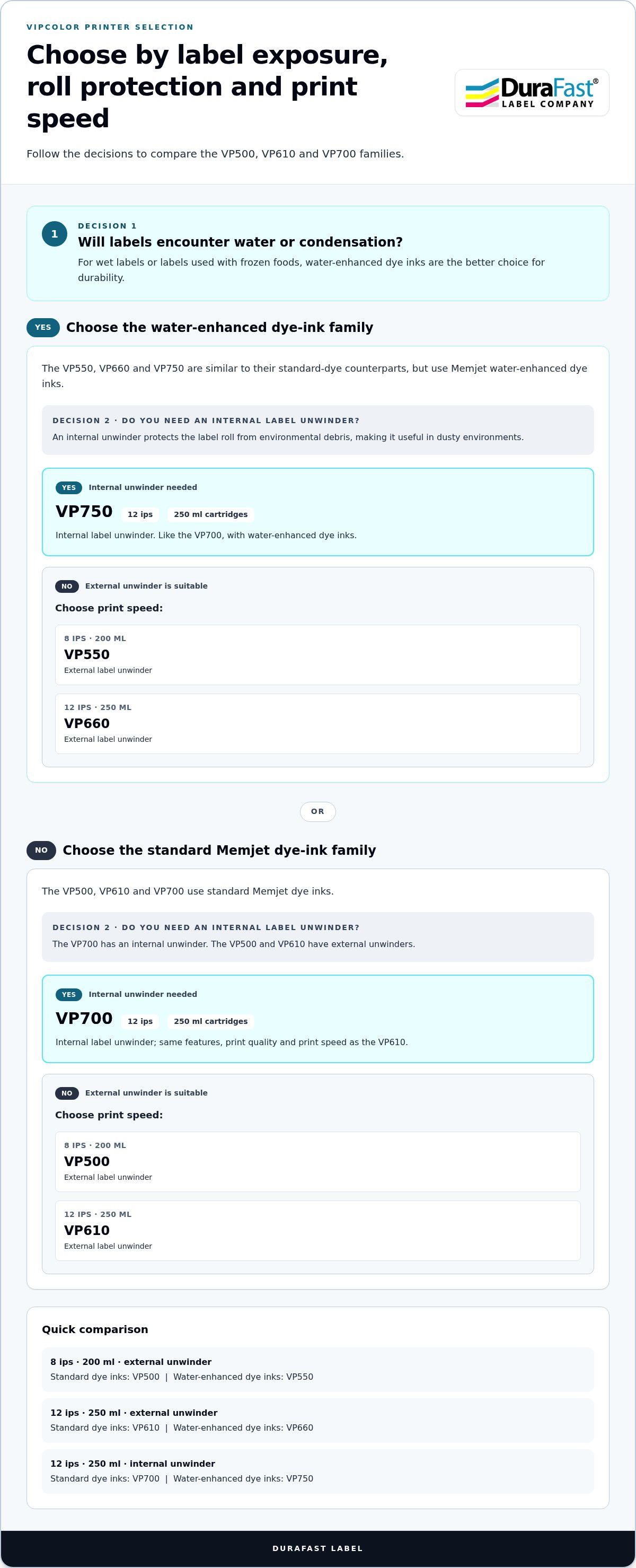
- For labels exposed to water or condensation, consider VIPColor models that use Memjet water-enhanced dye inks; choose between external and internal unwinding based on the print environment.
Glossy polypropylene inkjet label material
Clear gloss stocks have a transparent face and shiny finish, but construction and printer compatibility are key. If you’re comparing clear gloss inkjet label rolls in Canada, match the face material and ink system to the label’s intended use and exposure.
A clear label keeps the container visible, while its gloss finish reflects light and gives printed details a polished appearance. Polypropylene and polyester are different face materials, even though both are used for clear labels. Check the roll’s material description rather than treating the terms as interchangeable.
Dye Inkjet Finishes and Gloss Stocks
Dye inkjet labels are designed to receive liquid ink, and their surface finish affects the printed result. Gloss paper has a paper face; gloss BOPP is a polypropylene film. Both can offer a glossy appearance, but the paper and film constructions suit different product and handling needs. Memjet-based printers use dye inks and a page-wide printhead, so select stock intended for the printer’s ink system. An inkjet label range is relevant when comparing inkjet-compatible materials.
Clear Label Formats and Comparisons
Glossy clear square labels provide a defined shape while showing the surface behind them. Clear gloss inkjet labels differ from laser-compatible labels in both printing process and stock. Standard inkjet inks and laser toner aren’t opaque, so the container colour can show through. A white underprint beneath the colours can increase opacity. Water resistance describes the material’s performance; whether the finished label is waterproof depends on its use.
For polyester stock, the listed construction has a 2-mil face and 7-mil total thickness. It uses a 50# semi-bleached kraft release liner, with a basis weight of 52. The glossy clear face is described as optically clear, shiny and highly water-resistant. These specifications help distinguish a film label from gloss paper; they don’t make every clear stock identical. For example, a product label needing a transparent film face has different material priorities than a paper label chosen for its gloss.
Light colours can look muddy or dark when printed directly onto clear film. A light-coloured surface behind the label can help, while a white underprint beneath the artwork creates a more opaque base. Consider the container colour before finalizing the design. The visible surface is part of the design, not just a backing for the printed image.
Select the inkjet label or glossy media setting that matches the stock, then run a test print and inspect colour and feeding. Let the print dry fully before handling; drying depends on ink coverage, printer and surrounding conditions. Clear gloss inkjet labels may resist water, but that doesn’t automatically make the printed label waterproof. Inkjet and laser stocks are designed for different printing processes, so choose stock compatible with the printer.
Permanent adhesive and smooth-surface use
A permanent acrylic adhesive is designed to keep a label attached after application, not to support routine repositioning. The glossy inkjet label specification describes a general-purpose permanent adhesive with high initial tack. That initial grip helps the label bond to a suitable surface, but surface condition and application temperature affect the result. Match the adhesive to the item being labelled, not just the label’s appearance.
Listed smooth, general-purpose surfaces include glass, metal, polyethylene and other plastics. The adhesive is also described for corrugated material, films and non-polar surfaces. A glass bottle, plastic container or corrugated package can be a useful starting point when assessing fit. Surface shape and condition matter: a clean, smooth area differs from a dusty, textured or curved one.
Temperature specifications need careful interpretation. The permanent acrylic adhesive has a minimum application temperature of +35°F. Its stated service temperature range is -20°F to +180°F. A separate listed adhesive temperature range for glossy inkjet labels is -4°F to 176°F. These figures describe different stated specifications; don’t treat the application minimum as the storage or operating range. Keep the label’s application conditions distinct from the temperatures it may experience afterward.
For a custom label workflow, consider when and where the label will be applied. A label placed on a room-temperature glass container has different conditions from one applied to a cold plastic surface. Minimum application temperature matters when applying the label, while the service range relates to conditions after attachment. Printer choices such as Epson ColorWorks don’t change the adhesive’s surface requirements; the label must still suit the substrate and application conditions.
Before placing repeat orders, test the label on the actual surface and follow the intended application process. Check for lifting edges, wrinkles or shifting after contact. Testing in the final application environment is especially useful near water or chemicals. These conditions can affect the whole label construction, so assess the printed face and adhesive together rather than judging adhesion alone.
Print software controls the artwork and printer output, not the adhesive bond. A label file can position a product name accurately, for example, but it can’t compensate for an unsuitable surface or application temperature. Record the surface, application conditions and intended exposure alongside the artwork specifications. This makes repeat production easier to assess when orders involve different containers or packaging materials.
If you’re planning a custom inkjet label order, sharing the substrate and application conditions helps frame the requirements. Use the label application contact page to discuss how those details fit your label workflow.
Roll sizes, cores and outside diameters
Roll fit depends on label size and the printer’s roll path. Compare label dimensions, core and outside diameter before choosing glossy inkjet roll labels.
Roll Dimensions and Outside Diameters
A listed clear polyester format measures 3 inches wide by 2.5 inches long. This gives you a specific label size to compare with your artwork and packaging area. The roll is listed with a 3-inch inside diameter and a 6-inch outside diameter. Confirm that the printer can accommodate both dimensions, not just the label width.
Mini glossy inkjet rolls are listed with a 2-inch core and 4-inch outer diameter. Standard glossy inkjet rolls are listed with a 3-inch core and 6-inch outer diameter. These formats differ in how much roll space they require. A compact printer setup may favour the smaller roll profile, while a larger supported roll can suit longer production runs.
For roll-fed clear inkjet labels, the listed compatible printer models are Primera LX800, LX810 and LX900. Printer compatibility still depends on the roll width, core, outside diameter and sensor arrangement. Treat the model list as a starting point, then compare the physical roll dimensions with the printer’s requirements.
Core Options and Roll Quantities
The glossy inkjet label range is available with 2-inch and 3-inch cores. Core size describes the opening through the centre of the roll, while outside diameter describes the full roll’s width across its wound material. Both measurements affect mounting and clearance, so don’t choose by core alone. Check how the roll sits on the holder and feeds through the printer.
The listed clear polyester roll contains 900 labels, and the carton contains 12 rolls. These quantities help plan replenishment and estimate how many labels are available across a carton. For a run using one label per package, the roll quantity gives a direct unit count before setup waste or artwork changes.
Before ordering, compare four details: label dimensions, core diameter, roll outside diameter and printer sensor compatibility. Sensor placement matters because printers use sensors to detect label gaps or marks. A roll that fits the spindle may still feed incorrectly if its sensing method doesn’t match. Record the printer model and roll measurements together to simplify repeat orders.
High-gloss inkjet stock and matte paper have different finishes and aren’t interchangeable descriptions. Matte paper has a non-gloss surface; a high-gloss roll has a reflective face. Choose the finish you need, then confirm the roll dimensions and core suit the printer. This separates appearance from the mechanical fit that determines whether labels feed properly.
CAD prices for gloss inkjet labels
Compare gloss inkjet label costs using the same material, format and order quantity. A listed price is useful only when it describes the roll you need, not a different finish or printer supply. For Canadian purchases, compare amounts in CAD and distinguish product cost from delivery charges and other order terms.
Start with the product specification. A clear polyester roll and a gloss paper roll are different materials, so their prices aren’t directly comparable. Pre-sized labels and continuous formats may also suit different workflows. Match label dimensions, roll core and outside diameter to your inkjet printer before comparing listings. Otherwise, a lower price may be for a roll that doesn’t fit your equipment.
Next, compare the quantity and unit in each listing. A price per roll differs from a price per carton, so identify the selling unit before calculating what you need. If one listing is for individual rolls and another for a carton, convert both to the same unit for a clear comparison. Include the number of rolls required for the production job, not just the displayed amount.
Price alone doesn’t establish print performance. Confirm that the stock is intended for inkjet printing, then check your printer’s supported media and the resolution your artwork requires. Small text or fine graphics may need a compatible face material to reproduce details clearly. Water resistance may matter for the application, but don’t assume a resistant face means printed ink will withstand every exposure.
Return terms and shipping costs for label rolls in Canada depend on the seller’s order terms and delivery destination. They aren’t determined by label material or printer specifications, so review the applicable terms and delivery charge before purchasing.
For a consistent comparison, record the product format, material, quantity basis, CAD amount, shipping charge and return conditions together. This gives purchasing teams a practical way to compare listings without mixing product prices and delivery costs. It also helps assess repeat orders when label size or roll format changes.
Finally, consider the cost of a mismatch. A roll that doesn’t fit the printer or has an incompatible finish can interrupt production, even if its listed price looks attractive. Compare roll specifications with the printer model first, then assess the complete order terms. This keeps price decisions grounded in fit, print requirements and intended use.
Continuous labels and pre-sized formats
Choose a format based on how each label is designed, printed and applied. Continuous stock provides an unbroken printable surface, while pre-sized formats have defined label boundaries. A clear polyester roll described in the product details is perforated, providing a separation point between sections. This can affect handling after printing, especially when labels are applied by hand.
Pre-sized formats suit repeat applications where each item needs a consistent shape and layout. A square clear label, for example, can frame a product name or logo on a jar. Its fixed shape helps organize graphics within a known area. Before printing, set the page size and artwork dimensions to match the format, then check that text and borders stay within the printable area.
Continuous stock suits applications where the label length needs to match the content. A longer product description or variable text may need more room than a compact logo. The printer and label software must support the selected media and layout. Confirm the printer’s feed and cutting approach before production, since the format affects how labels are separated and presented.
Perforated rolls offer a distinct workflow: the roll feeds as a sequence, while perforations provide a break for separation. This can help when operators print batches and peel labels individually. Test a short run to see how perforations align with the design and how easily each label separates. Keep important graphics away from perforation lines to protect legibility.
For either format, match the layout to the application surface. A clear label on a bottle might use a narrow design that leaves the product visible; a specialty package may need more room for instructions or branding. Colour label printers can produce detailed graphics, but transparent stock lets the background show through. Account for the container colour and position key text where it remains easy to read.
Use this selection sequence: identify the application, choose continuous or pre-sized stock, set the artwork dimensions, then test feeding and separation. For pre-sized labels, verify the page setup against the die-cut layout. For continuous stock, confirm the intended length and finishing method. A printer-ready test helps catch layout issues before a full production run.
If you’re deciding which roll format fits your application, discuss your label format and workflow with the team.
DuraFast Label Company Canada: VIPColor Label Printers
DuraFast Label Company Canada offers VIPColor Label Printers for businesses assessing colour label production alongside clear inkjet stock. The VP500, VP610 and VP700 use Memjet Technology and standard Memjet dye inks. The VP500 prints at 8 ips with 200ml ink cartridges; the VP610 prints at 12 ips with 250ml cartridges. Both have external label unwinders. The VP700 matches the VP610’s features, print quality, speed and 250ml cartridges, but has a built-in internal unwinder to protect the roll from environmental debris in dusty settings.
The similar VP550, VP660 and VP750 use Memjet water-enhanced dye inks, making them better choices for labels exposed to water or condensation. The VP550 prints at 8 ips with 200ml cartridges; the VP660 prints at 12 ips with 250ml cartridges. Both have external unwinders. The VP750 shares the VP660’s features, print quality, speed and 250ml cartridges, with an internal unwinder like the VP700. Contact DuraFast Label Company Canada or visit durafastlabel.ca to explore printer options.
Make your next label run a confident one
Turn your label requirements into a practical production plan. Consider the product surface, print environment and how labels move from roll to finished package. This gives you a clearer basis for choosing supplies and a printer suited to your workflow. For clear gloss inkjet label rolls in Canada, compatibility matters more than finish alone.
DuraFast Label Company Canada offers VIPColor, Afinia and Primera label printers to explore alongside your label-printing needs. The right setup depends on the printer, material and application you have in mind, so bring those requirements together before choosing.
Contact DuraFast Label Company Canada to discuss your label-printing needs. A well-matched setup can help you move ahead with greater clarity and confidence.
Frequently Asked Questions
Where can I buy clear gloss inkjet label rolls in Canada?
Canadian businesses can explore inkjet label supplies and printing equipment through DuraFast Label Company Canada. Match the roll’s material and format to your printer and packaging workflow. A clear film label for a product jar, for instance, has different requirements from a paper label for an indoor package. Keep the printer model, label dimensions and intended application together when comparing options.
What sizes and core diameters are available for clear gloss inkjet label rolls?
Available formats include different label dimensions and roll cores, with compatibility depending on the printer. A listed clear polyester format measures 3 inches by 2.5 inches, and glossy inkjet rolls are available with 2-inch or 3-inch cores. For example, a compact printer may need a smaller roll profile than a production setup. Compare core, roll diameter and printer feed capacity as one fit decision.
Are clear gloss inkjet labels compatible with dye and pigment inkjet printers?
Compatibility depends on the label’s ink-receptive coating and the printer’s ink formulation. Dye and pigment inks can interact differently with glossy surfaces, so don’t assume one stock suits both systems. Check the label material’s intended ink type, then print a sample using the actual printer and settings. Assess colour, drying and smearing before producing a full batch, especially for fine text or detailed graphics.
How much do clear gloss inkjet label rolls cost in Canada?
Compare Canadian prices in CAD and on the same unit basis, such as per roll or per carton. The amount depends on label material, dimensions, roll quantity and format. For a useful comparison, separate the product amount from shipping and compare equivalent specifications. A smaller roll and a carton quantity aren’t directly comparable, even if both listings describe glossy clear inkjet stock.
Are clear gloss inkjet labels waterproof, scratch-resistant, or oil-resistant?
Clear polyester inkjet stock is described as having excellent water resistance, but that alone doesn’t establish waterproof performance for every finished label. It also doesn’t confirm scratch or oil resistance. Ink, adhesive, surface preparation and exposure all affect the result. For a label on a bottle handled with oily fingers, test a printed sample under the actual conditions before committing to production.
Do clear inkjet labels need a laminate or coating to prevent smearing?
Not every clear inkjet label needs a laminate, but the ink and face coating must work together. Let a test print dry fully, then handle and rub a sample to assess smearing. Heavy ink coverage, small text and frequent handling can make a protective layer worth evaluating. Test any laminate with the printed stock first, since an added layer can change the appearance and handling of clear labels.
What printer settings and drying time work best for clear gloss inkjet labels?
Choose the inkjet label or glossy media setting that matches the stock, then run a test print and check colour and feeding. Let the print dry fully before handling; drying depends on ink coverage, printer and surrounding conditions.
How do I load and print on clear gloss inkjet label rolls?
Before loading the roll, confirm its width, core, outside diameter and sensor compatibility match your printer. Select the inkjet label or glossy media setting for the stock, then run a test print and check that it feeds properly.